LangGraph Human-in-the-Loop: The Pattern LangChain Hides
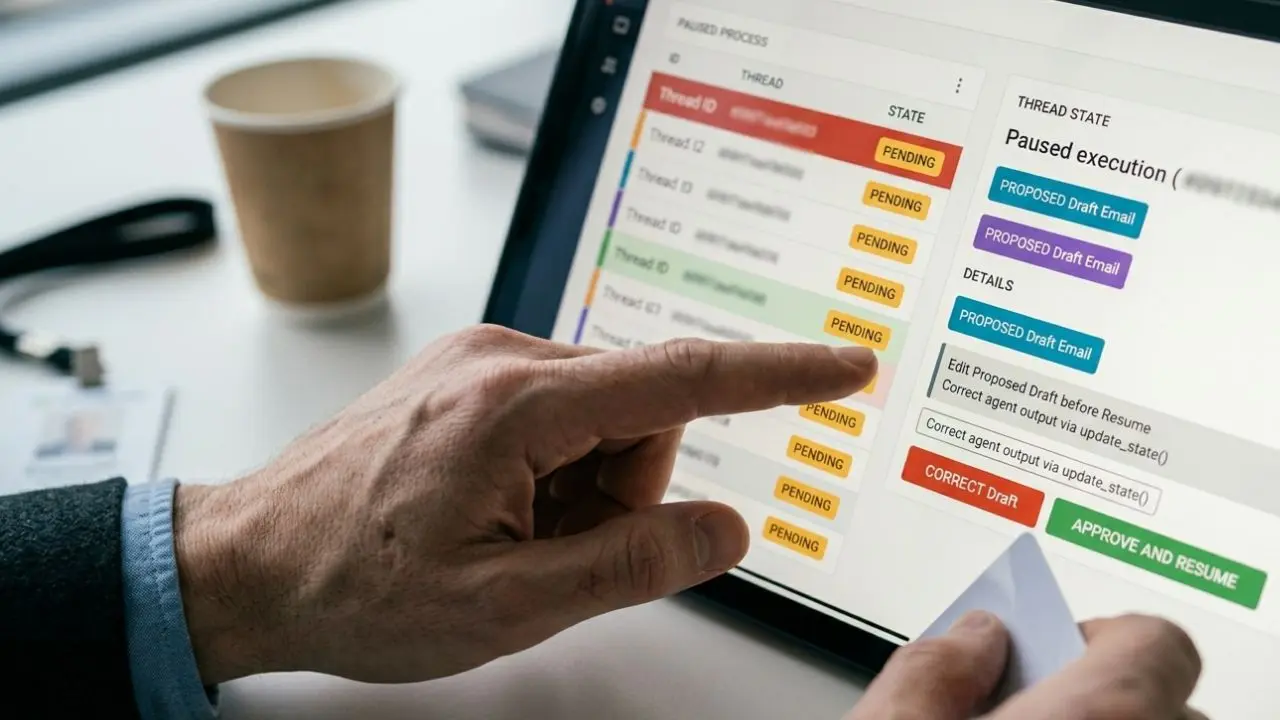
- Persistent Checkpointing is Mandatory: In-memory states fail during long human delays; you must implement Postgres-backed checkpointers.
- The Interrupt Pattern: True HITL relies on explicit node interrupts, not standard conditional edges.
- State Mutability: LangGraph allows you to edit the exact agent state mid-pause before resuming the flow.
- Audit Trails: Capturing human actions during the interrupt sequence is vital for enterprise compliance.
Most langgraph human in the loop tutorial guides skip the interrupt pattern that survives a failed approval, leaving your multi-agent architecture highly vulnerable.
When building autonomous systems, the gap between a demo and a production-grade safety net is massive. Here is the exact, production-ready implementation you need before your agent commits a fatal, irreversible error.
Integrating rigorous human oversight seamlessly is a cornerstone capability required by any functional ai agent framework decision matrix CTO checklist.
Without a durable pause-and-resume state, your agents will crash when approvals take days instead of seconds. We uncover the exact structural patterns that LangGraph's foundational documentation glazes over, allowing you to lock down your deployments confidently.
The Flaw in Basic Human-in-the-Loop Tutorials
If you follow standard documentation, you likely built a naive system that pauses for input but drops the state if the server restarts. This is unacceptable for enterprise environments.
Basic tutorials rely heavily on short-lived thread memories. When an executive takes three days to approve a high-stakes financial transaction, the agent’s context window expires.
This causes catastrophic logic breaks. To succeed in production, your langgraph human in the loop tutorial implementation must prioritize absolute state persistence.
Implementing the Persistent Interrupt Pattern
You cannot rely on simple input loops to manage human decisions. Instead, you need the LangGraph interrupt pattern.
This pattern formally signals the orchestration engine to halt execution at a specific graph node. It yields control completely back to the calling application.
By explicitly yielding control, you free up compute resources while the workflow waits in a suspended, highly durable state until a human webhook triggers the resume action.
Defining the State Graph Breakpoints
Breakpoints must be injected right before high-risk nodes (e.g., executing a database write or sending a client email).
You define these in your compilation step using the interrupt_before parameter.
- Identify critical execution nodes: Mark functions that mutate external systems.
- Apply the breakpoint: Pass the target node names to
interrupt_before=['your_critical_node']. - Handle the yield: Catch the graph’s execution pause in your main application logic.
This rigid structure is far superior to standard conversational pauses, mirroring the robust multi-agent orchestration patterns enterprise teams rely on.
Leveraging Checkpointers for Long-Running Pauses
A breakpoint is useless if the memory is volatile. To survive a failed approval or a delayed response, you must connect a database checkpointer.
LangGraph provides AsyncPostgresSaver specifically for this purpose.
- Initialize your Postgres pool: Ensure it handles persistent connections.
- Bind the checkpointer: Pass it to your graph during compilation (
checkpointer=your_postgres_saver). - Thread IDs are critical: Every paused state must be tied to a unique
thread_idso the human reviewer can recall the exact context later.
Managing State Modifications During the Pause
A true human-in-the-loop system isn't just about a simple "Yes" or "No" approval. A human operator must be able to correct the agent's work.
When the graph is interrupted, the state is exposed. A reviewer can inspect the proposed tool calls or drafted emails.
If the agent hallucinates, the human operator can use graph.update_state() to inject the corrected data directly into the node's memory before resuming.
This ensures the agent proceeds with perfect context, drastically reducing the cost-per-decision by preventing downstream errors.
Auditing and Queueing Human Approvals
In a scaled environment, you will have dozens of agent runs paused simultaneously. You cannot manage this manually.
You must query your database for all active threads currently stuck at the breakpoint. Build an internal dashboard where managers can view the exact state payloads.
For every approval or state modification, log the human user's ID alongside the thread_id. AI Dev Day experts frequently warn that lacking this audit trail will result in failed security and compliance reviews.
Only after the audit log is secured should your application call graph.invoke(None, thread_config) to resume the agent's final execution.
Conclusion
Mastering the true langgraph human in the loop tutorial pattern separates toy applications from enterprise-grade AI architecture.
By ditching basic pauses for the persistent interrupt pattern, you eliminate catastrophic state-loss risks.
Implement strict interrupt_before breakpoints, secure your context windows with Postgres checkpointers, and give your human reviewers the power to mutate state safely. Doing so ensures your multi-agent deployments are highly resilient, auditable, and completely under your control.

Frequently Asked Questions
1. How do I add human approval to a LangGraph agent?
You add human approval by defining breakpoints using the interrupt_before argument when compiling your state graph. This explicitly pauses the graph's execution right before a specified node, awaiting external input.
2. What is the interrupt pattern in LangGraph?
The interrupt pattern is a structural design where the execution yields control back to the main application. Instead of trapping the process in an endless loop, the graph securely parks its state and stops running until a resume command is explicitly invoked.
3. Can a LangGraph agent wait days for human input?
Yes, but only if you use a persistent checkpointer like Postgres or SQLite. If you rely on the default in-memory state, the agent's context will be lost the moment your server restarts or the process drops.
4. How does LangGraph checkpointing support human in the loop?
Checkpointing serializes the exact state of the graph—including all message history and intermediate tool outputs—and saves it to a database. When a human finally approves the action, the graph reloads this exact state and resumes seamlessly.
5. Where should I put the human-in-the-loop step in a LangGraph state graph?
You should place the breakpoint immediately before any node that executes an irreversible or high-risk action. Common placements include before sending an email, executing a financial transaction, or committing code to a repository.
6. Can I edit the agent state during a human approval pause?
Absolutely. While the graph is interrupted, an administrator can use the update_state method to rewrite the proposed outputs, correct hallucinations, or add new parameters before allowing the graph to proceed.
7. How do I queue multiple agent runs awaiting human review?
Since every graph execution is tied to a unique thread_id, you can query your persistent checkpointer database for all threads currently resting at a breakpoint node. You then display these threads in an internal queueing dashboard for reviewers.
8. Is human in the loop compatible with LangGraph streaming?
Yes. You can stream the agent's progress right up until the breakpoint. The stream will yield an interrupt event, signaling your front-end application to display the approval UI to the end-user.
9. How do I audit human approvals in a LangGraph production system?
To audit approvals, you must capture the identity of the human operator in your application layer when they trigger the resume function. Save this user ID, the timestamp, and the exact thread_id into a separate secure audit logging table.
10. What database backs LangGraph state during a human wait?
For production environments, LangGraph natively supports Postgres via AsyncPostgresSaver and SQLite via SqliteSaver. You can also write custom checkpointers for Redis or MongoDB if required by your stack.