The Browser Operator Agent System Design
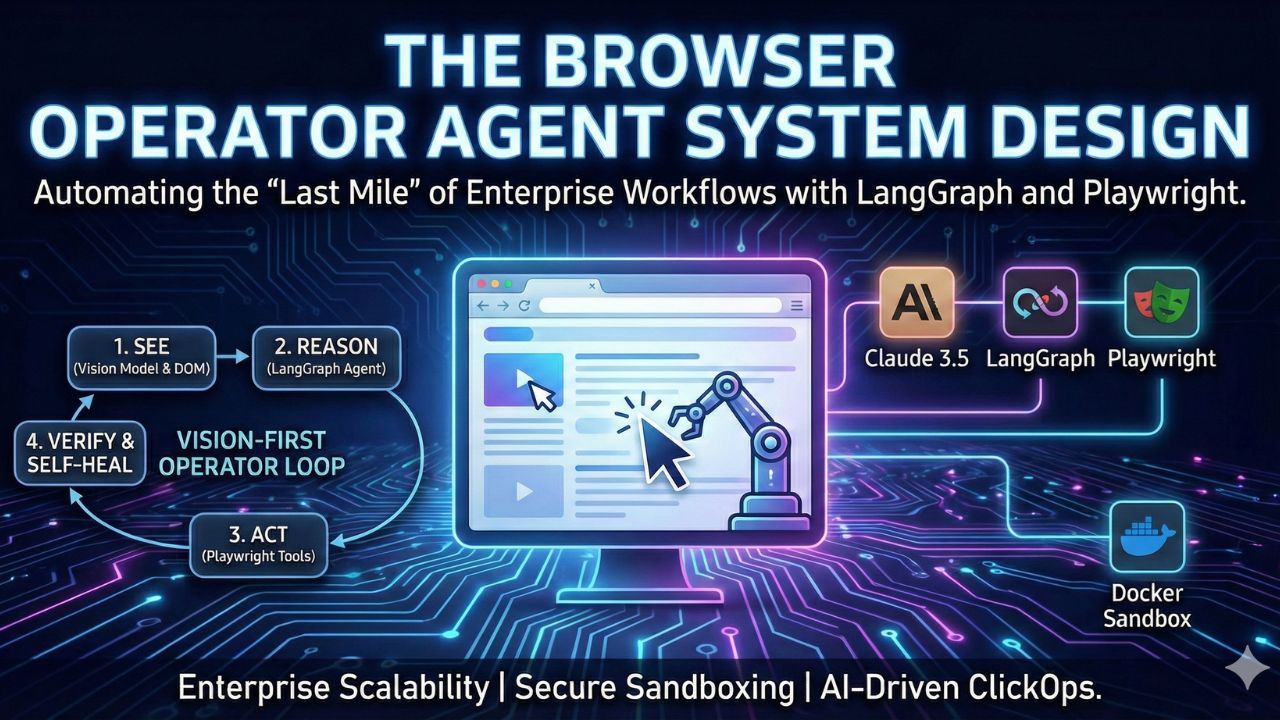
Automating the "Last Mile" of Enterprise Workflows with LangGraph and Playwright
Author: AgileWoW Team
Category: Agentic Automation / Computer Use
Read Time: 12 Minutes
Parent Guide: The Agentic AI Engineering Handbook
In an ideal world, every application has a clean REST API. In the real world, 40% of enterprise value is locked inside legacy SaaS portals, government websites, and internal tools that have no API documentation.
The Browser Operator Agent is designed to bridge this gap. It is an AI system that "looks" at a webpage (using Vision models) and "clicks" buttons (using Playwright) just like a human would.
This blueprint details the architecture for building a safe, resilient browser agent that can navigate complex dynamic websites, handle "ClickOps" tasks, and self-heal when UI elements change.
1. The Design Challenge: The "Fragile DOM" Problem
Traditional Robotic Process Automation (RPA) scripts are brittle. They rely on hard-coded CSS selectors (e.g., #submit-btn-v2). If the website updates its frontend, the bot crashes.
The Architectural Goal: Create a "Vision-First" agent. Instead of blindly hunting for code selectors, the agent should:
- See the screen (Take a screenshot).
- Reason about the layout ("Where is the 'Submit' button relative to the form?").
- Act precisely (Calculate X/Y coordinates or generic selectors).

2. The Tech Stack Selection
To build a "Computer Use" agent, we need a stack that handles State, Vision, and Action.
| Component | Choice | Why? |
|---|---|---|
| Orchestrator | LangGraph | Essential for managing the "Observation -> Thought -> Action" loop and maintaining browser state. |
| Action Engine | Playwright | Faster and more reliable than Selenium. Handles modern React/Vue hydration states better. |
| Vision Model | Claude 3.5 Sonnet (Computer Use) | Currently the SOTA (State of the Art) model for interpreting screenshots and outputting accurate cursor coordinates. |
| Sandbox | Docker | Critical Security. The browser must run in an isolated container to prevent file system access. |
3. Architecture Deep Dive: The Operator Loop
3.1 The Perception Layer (The "Eyes")
The agent does not read HTML text alone (which is often messy). It captures the Accessibility Tree (a simplified text representation of the UI) combined with a Screenshot.
Design Pattern: "Annotated Screenshots". Before sending the image to the LLM, we overlay a grid or bounding boxes on clickable elements to improve accuracy.
3.2 The Reasoning Layer (The "Brain")
We use a ReAct (Reason + Act) loop implemented in LangGraph.
- State Input:
Current URL,Screenshot,Previous Action. - LLM Decision: "I am on the login page. I need to type the username."
- Tool Call:
browser.type(selector="#user", text="admin").
3.3 The Action Layer (The "Hands")
We wrap Playwright methods into generic tools exposed to the LLM:
navigate(url)click(element_description)type(text)scroll(direction)
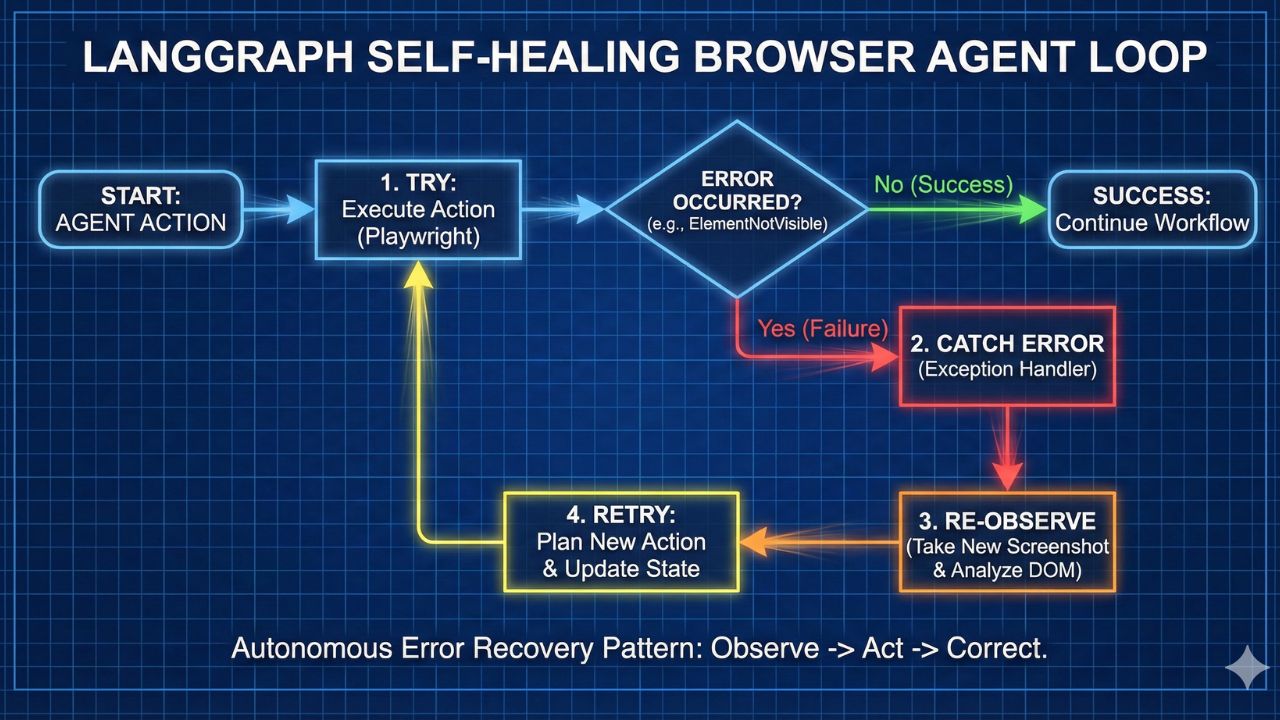
Self-Healing Mechanism:
If the agent tries to click a button and Playwright throws an error (ElementNotVisible), the agent catches the error, takes a new screenshot, realizes a popup is blocking the view, closes the popup, and retries.
4. Implementation Guide: Building the "ClickOps" Agent
Phase 1: The Docker Sandbox
Never run a browser agent on your local machine's main OS.
- Setup: Create a
Dockerfilethat installs Chrome and Playwright dependencies. - Connection: Use
remote-debugging-portto let your LangGraph script control the browser inside the container.
Phase 2: Defining the Tools
Don't expose the raw Playwright API. Create simplified wrappers.
@tool
def click_element(description: str, bbox: list):
    """Clicks an element based on bounding box coordinates."""
    page.mouse.click(bbox[0], bbox[1])
Phase 3: The Supervisor Graph
Use LangGraph to define the mission.
- Node 1: Navigator. Goes to the URL.
- Node 2: Observer. Takes a screenshot and analyzes DOM.
- Node 3: Actor. Executes the click/type.
- Edge: If
goal_achieved, exit. Else, loop back to Observer.
5. Use Cases for the Enterprise
1. The "Procurement Punch-Out" Bot
Scenario: Your company needs to buy 50 laptops from a vendor portal that has no API.
Solution: The agent logs in, searches for the SKU, adds to cart, and fills out the shipping info automatically.
2. Legacy Government Data Entry
Scenario: Uploading CSV data into an old government tax portal.
Solution: The agent reads the CSV row by row and types it into the portal forms, handling validation errors (e.g., "Invalid Date Format") intelligently.
3. Automated QA Testing
Scenario: Testing a new feature on your staging site.
Solution: Instead of writing brittle Cypress tests, tell the agent: "Go to the staging site, log in as a user, and try to break the checkout flow."
6. Production Readiness: Safety & Stealth
The "Bot Detection" Risk:
Websites use Cloudflare/Akamai to block bots.
Mitigation: Use residential proxies and "Stealth Mode" plugins in Playwright to mask the WebDriver signal.
The "Rogue Agent" Risk:
What if the agent keeps clicking "Buy"?
Safety Rail: Implement a "Budget Check" state. If the agent detects a "Confirm Payment" button, it must pause and request Human Approval via Telegram/Slack before proceeding.
7. Frequently Asked Questions (FAQ)
A: Playwright is faster, supports parallel execution, and handles modern dynamic web apps (React/Angular) much better. It has built-in "auto-waiting," meaning it waits for elements to appear before clicking, reducing the "flaky test" problem common in Selenium.
A: It can be expensive. Sending high-res screenshots to Claude 3.5 Sonnet for every step adds up. For production, we recommend a Hybrid Approach: Use the Vision model only when navigation fails or the DOM is confusing. Use cheaper, text-only HTML parsing for simple forms.
A: Technical CAPTCHAs (like Cloudflare Turnstile) often block bots. Visual CAPTCHAs (select the traffic lights) can be solved by Vision models, but it is often slower and unreliable. We recommend using "Human-in-the-Loop" handoff: the agent pings you to solve the CAPTCHA, and then resumes work.
A: "Computer Use" is a capability; this blueprint is the architecture to control it. Anthropic provides the model that understands screens. This blueprint provides the LangGraph orchestrator that manages the state, memory, and safety rails required to use that model in an enterprise environment.

8. Sources & References
Open Source Resources:
Technical Documentation
- Anthropic Computer Use: Official Beta Guide – The foundational model capability.
- Playwright Python: API Reference – The industry standard for browser automation.
Frameworks
- LangGraph: Multi-Agent Tutorials – How to build stateful loops.
- Browserbase: Headless Browser Infrastructure – Managed infrastructure for running browser agents at scale.