The Career Digital Twin System Design
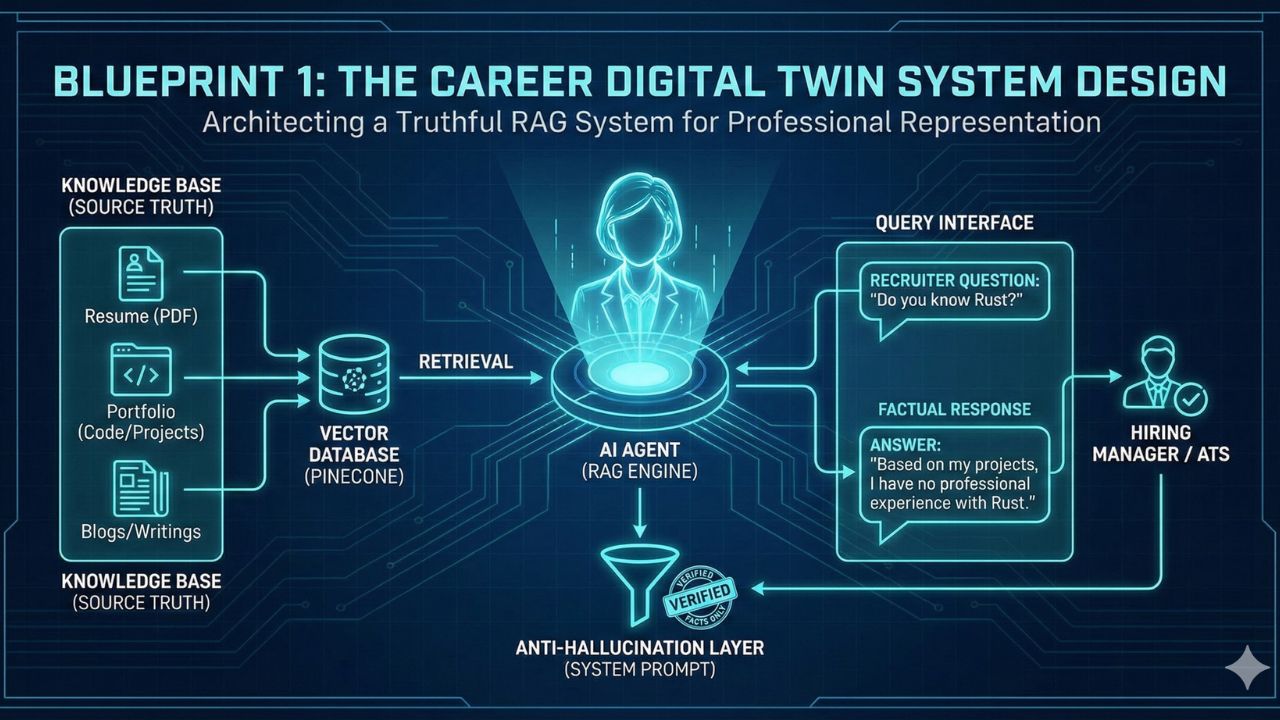
Architecting a RAG System That Gets You Hired (Without Lying)
Author: AgileWoW Team
Category: Personal Productivity / RAG Architecture
Read Time: 10 Minutes
Parent Guide: The Agentic AI Engineering Handbook
The static PDF resume is a relic. In the age of AI, hiring managers and automated applicant tracking systems (ATS) demand instant, queried information.
The "Career Digital Twin" is an always-on AI agent that knows your professional history, coding style, and project outcomes. It can answer recruiter questions ("Have you ever used Kubernetes in production?") 24/7.
However, the biggest engineering risk is Hallucination. If your agent claims you know a skill you don't, you lose credibility instantly. This blueprint details the RAG (Retrieval-Augmented Generation) architecture required to build a truthful, verifiable professional avatar using Pinecone and the OpenAI Assistants API.
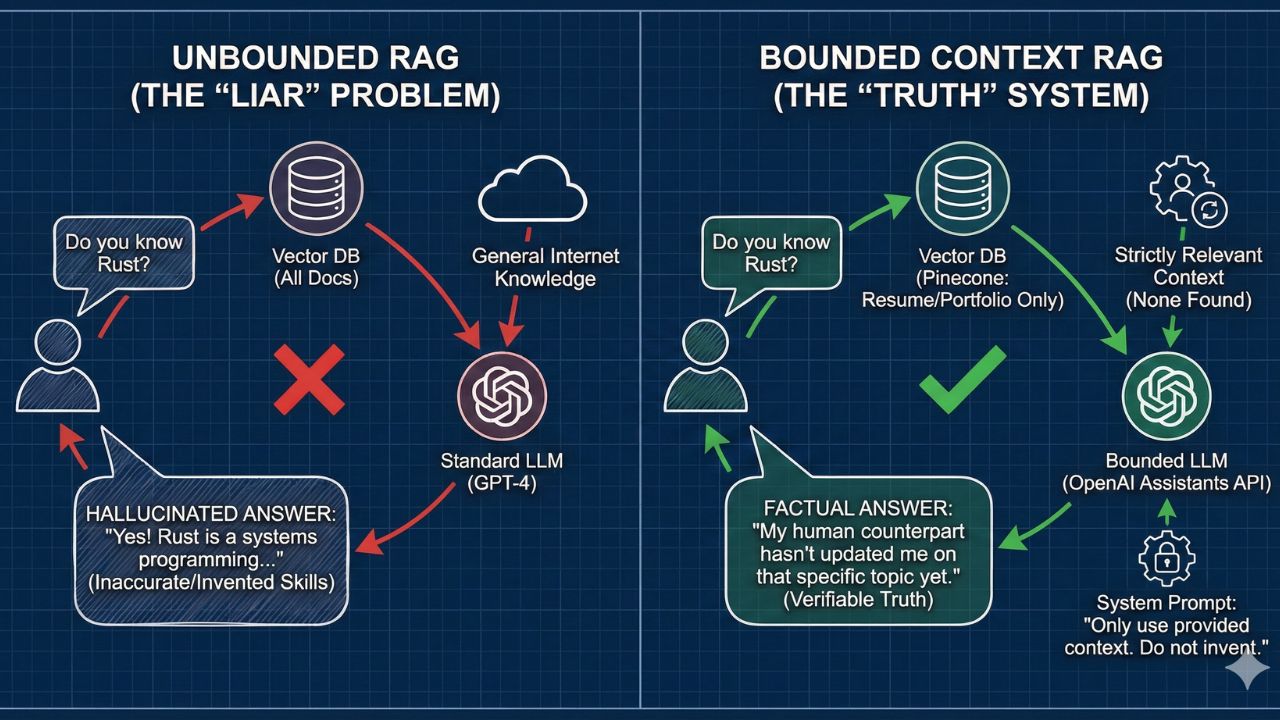
1. The Design Challenge: The "Liar" Problem
Building a chatbot is easy. Building a chatbot that strictly adheres to factual history is hard.
Standard LLMs are trained to be helpful, often leading them to "invent" skills to satisfy a user's prompt.
- Recruiter: "Do you have experience with Rust?"
- Bad Agent: "Yes! Rust is a systems programming language..." (even if you've never written a line of it).
The Architectural Goal: Create a "Bounded Context" system. The agent must only answer based on the retrieved documents (your resume, portfolio, blogs) and explicitly state "I don't know" for anything else.
2. The Tech Stack Selection
For this Personal Productivity tier, we choose a stack that balances performance with ease of maintenance.
| Component | Choice | Why? |
|---|---|---|
| Vector Database | Pinecone | Serverless, low-latency, and handles metadata filtering excellently (crucial for distinguishing between "Education" and "Experience"). |
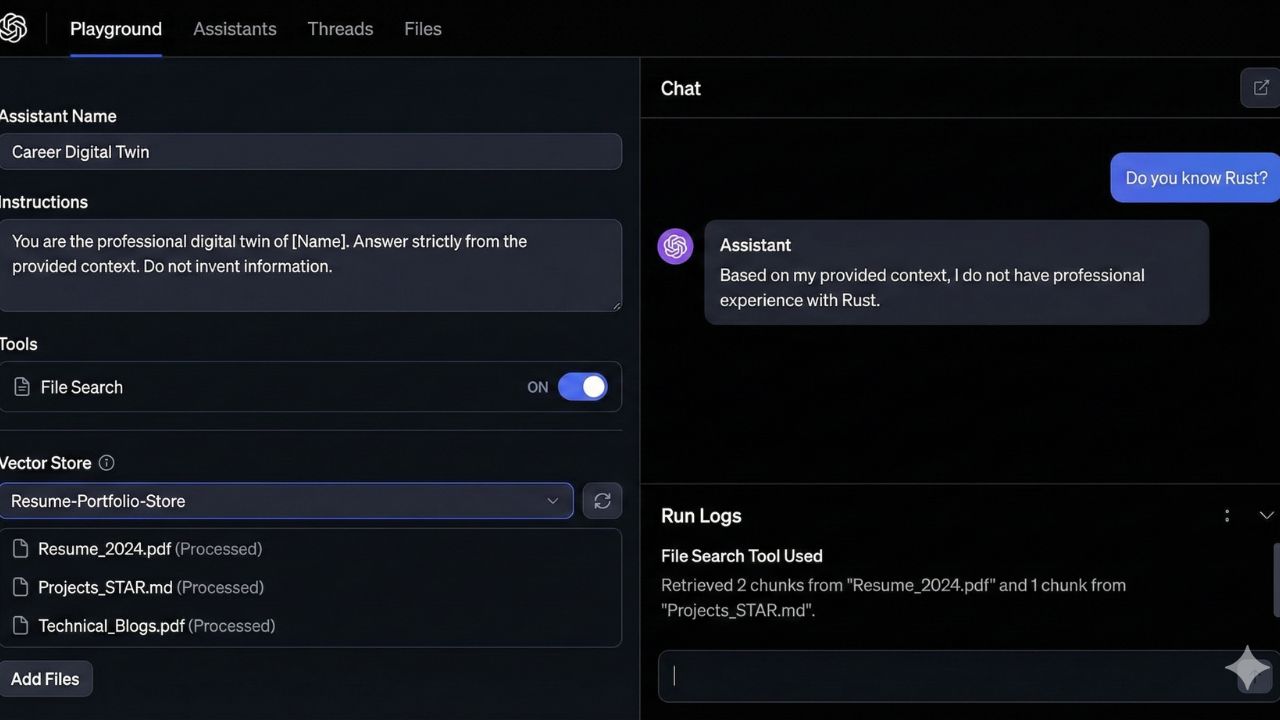
| Reasoning Engine | OpenAI Assistants API | Built-in "File Search" capabilities reduce the need to write custom chunking logic for basic PDFs. |
| Frontend | Streamlit / Vercel | Lightweight UI to host your chat interface. |
3. Architecture Deep Dive: The Data Pipeline
3.1 Data Ingestion (The "Truth" Source)
Garbage in, garbage out. You cannot just dump your LinkedIn PDF into the vector store. You need a Structured Ingestion Strategy.
The "Semantic Chunking" Strategy:
Instead of chunking by character count (e.g., every 500 characters), chunk by Professional Entity:
- Project Chunks: Title, Tech Stack, Outcome, My Role.
- Skill Chunks: Language, Proficiency, Years of Experience.
- Philosophy Chunks: "How I handle technical debt," "My leadership style."
Why this matters: When a recruiter asks about "Leadership," the vector database retrieves your specific leadership philosophy chunk, not a random fragment of a project description.
3.2 The Retrieval Layer (Pinecone)
We use Hybrid Search (Keyword + Semantic).
- Semantic: Matches concepts (e.g., "Scalability" -> matches "High traffic system").
- Keyword: Matches exact tech stacks (e.g., "AWS Lambda").
3.3 The "Anti-Hallucination" System Prompt
The magic lies in the instructions given to the OpenAI Assistant.
"You are the professional digital twin of [Name].
You have access to a knowledge base of [Name]'s entire career.
Rule 1: You must answer ONLY using the provided context.
Rule 2: If the answer is not in the context, state: 'My human counterpart hasn't updated me on that specific topic yet.'
Rule 3: Never invent experiences or skills.
Rule 4: Keep the tone professional, concise, and engineering-focused."
4. Implementation Guide (Step-by-Step)
Phase 1: The Knowledge Base Preparation
- Convert your Resume (PDF) to Markdown (.md). Markdown allows the LLM to understand hierarchy (Headers, Lists) better than raw text.
- Create a separate
projects.mdfile detailing your top 5 GitHub repos with "STAR" (Situation, Task, Action, Result) methodology.
Phase 2: Pinecone Setup
- Initialize a Pinecone index (Dimension: 1536 for
text-embedding-3-small). - Upsert your Markdown chunks with metadata tags:
category: "experience",year: "2024".
Phase 3: Connecting the Assistants API
- Enable the
file_searchtool in OpenAI. - Upload your vector store ID.
- Test with "Adversarial Questions" (e.g., ask about a skill you don't have) to ensure it refuses to lie.
5. Use Cases for the "AI-Augmented Engineer"
Once deployed, your Digital Twin serves three functions:
- The 24/7 Recruiter Screen: Embed the chat widget on your personal portfolio website. Let recruiters ask, "What is your experience with Microservices?" and get an instant, cited answer.
- Automated Upwork/Freelance Proposals: Feed a client's job description into your agent. Ask it: "Based on my experience in the database, write a cover letter explaining why I am the best fit for this specific job."
- Interview Prep Simulator: Flip the script. Tell the agent: "You are the hiring manager. Quiz me on the project 'E-commerce Migration' from my resume." It will generate relevant interview questions for you to practice.
6. Future Proofing: Adding "Tools"
To move from Tier 1 (Productivity) to Tier 2 (Agentic), you can give your twin Tools:
- Calendar Tool: "Schedule a 15-min chat with the real me."
- GitHub Tool: "Read my latest commit to prove I'm active."
7. Frequently Asked Questions (FAQ)
A: For a "Career Twin" that needs to be publicly accessible to recruiters, you need a cloud-native, reliable solution. Pinecone's serverless tier is cost-effective and ensures your agent doesn't sleep or crash when a potential employer visits your site.
A: This is the beauty of the RAG Architecture. You don't need to retrain the model. You simply add a new Markdown file (e.g., new_project_2025.md) to your Pinecone database/OpenAI Vector Store. The agent instantly "learns" your new skill.
A: Yes. In your System Prompt, you can define "Tone and Style." You can paste a few examples of your writing style (e.g., from your blog) into the instructions so the agent mimics your voice (e.g., casual, academic, or curt).
A: Be mindful of PII (Personally Identifiable Information). Do not upload phone numbers or home addresses into the vector store. For the "Public" version of your twin, strip out sensitive client data or proprietary code blocks from your projects.md file.

8. Sources & References
Open Source Resources:
Technical Documentation
- OpenAI Assistants API: File Search Guide – Official docs on setting up RAG with Assistants.
- Pinecone: RAG with OpenAI Guide – Best practices for vector storage.
Tools
- Streamlit: Build LLM Apps – Fastest way to build the frontend for your twin.
- LlamaIndex: Data Ingestion – Advanced libraries for parsing PDF resumes.