Understanding the MCP Architecture for Enterprise Data
Category: Enterprise Architecture / Data Engineering
Read Time: 10 Minutes
Parent Guide: The Agentic AI Engineering Handbook
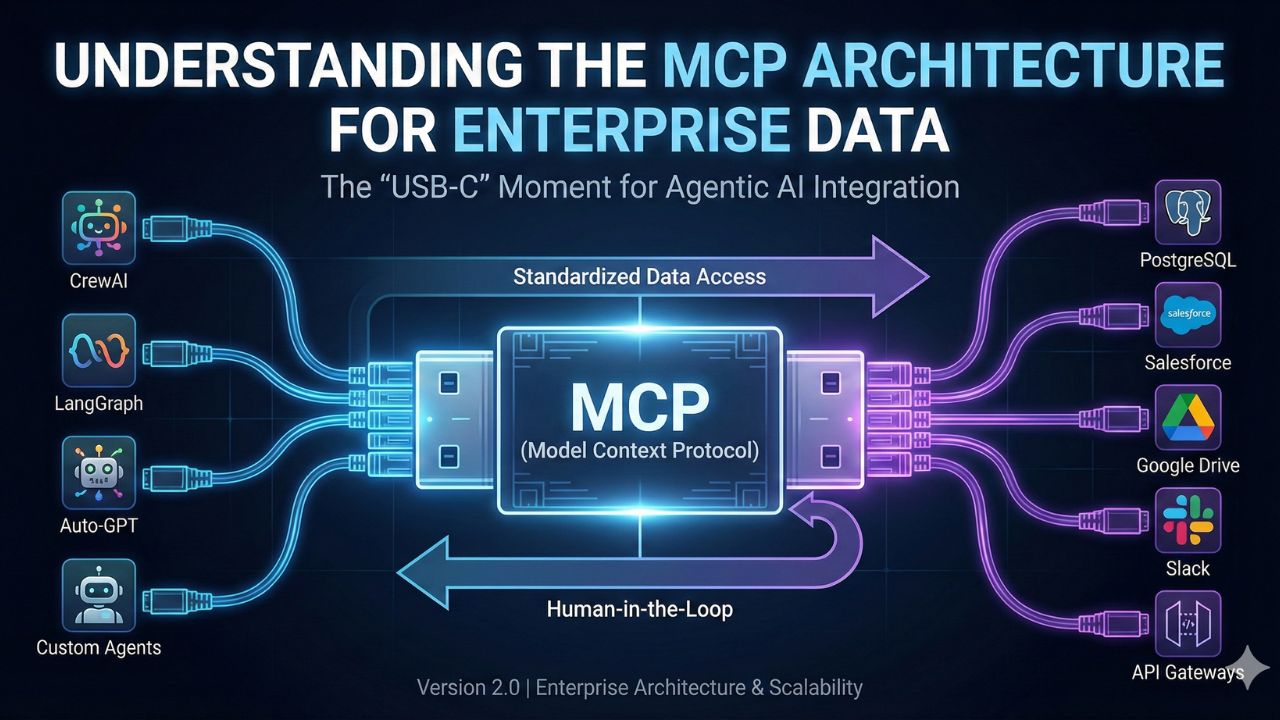
The biggest bottleneck in Enterprise AI is the "N x M" Connector Problem. Every time you want a new AI Agent to talk to a new data source (PostgreSQL, Slack, Google Drive), you have to write a custom API integration.
The Model Context Protocol (MCP), introduced by Anthropic in late 2024, solves this by standardizing the connection layer.
- Old Way: Build a custom connector for every agent-to-database pair.
- New Way: Build an "MCP Server" for your data once, and any MCP-compliant agent (Claude, ChatGPT, or your custom CrewAI bot) can query it securely.
This guide explains the architecture of MCP and how to implement it for scalable enterprise data access.
1. The Problem: The "Connector Spaghetti"
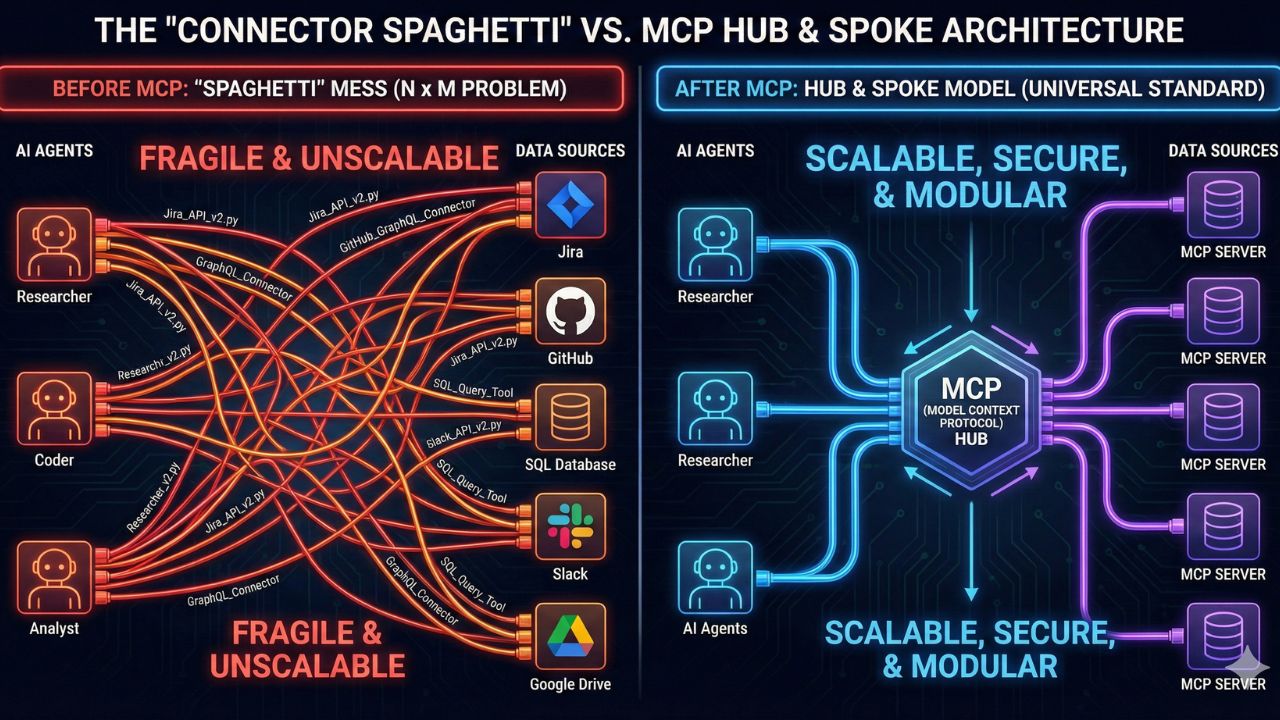
Before MCP, enterprise AI architecture looked like a mess of brittle Python scripts.
If you had 3 Agents (Researcher, Coder, Analyst) and 3 Data Sources (Jira, GitHub, SQL), you had to write and maintain 9 different integrations.
- The Researcher Agent needed a specific function to read Jira.
- The Coder Agent needed a different function to read Jira.
If Jira changed its API, you had to update code in multiple places. This fragility is why most enterprise AI PoCs (Proof of Concepts) fail to reach production. They break as soon as the underlying APIs change.
2. The Solution: MCP Architecture Explained
MCP introduces a universal standard, similar to how USB-C standardized charging cables. It decouples the AI Model (the Client) from the Data Source (the Server).
The Three Layers of MCP
- MCP Host (The Client): This is the AI Agent or LLM interface (e.g., Claude Desktop, or your custom CrewAI script). It "asks" for data.
- MCP Protocol (The Language): A standardized JSON-RPC protocol that handles the negotiation. The Client asks: "What tools do you have?" and the Server replies: "I can read emails and query SQL."
- MCP Server (The Data Gateway): A lightweight service that sits on top of your data. It exposes "Resources" (data) and "Tools" (functions) to the client.
Why this changes everything: You write the MCP Server for your SQL Database only once.
- Today, you connect it to Claude Desktop for manual analysis.
- Tomorrow, you connect it to a CrewAI swarm for automated reporting.
- Next week, you connect it to a new specialized coding agent.
Zero code changes required on the data side.
3. Core Components: Resources, Prompts, and Tools
To architect an MCP solution, you need to understand its three primitives.
3.1 Resources (Passive Data)
Resources are like "files" that the AI can read. They are read-only and safe.
- Example: A daily log file, a PDF report, or a specific row in a database.
- Use Case: Giving an agent context about "Company Policies" without letting it change them.
3.2 Tools (Active Functions)
Tools are executable functions that the AI can call. They can take actions or perform calculations.
- Example:
execute_sql_query(query),send_slack_message(channel, text),git_commit(message). - Security: Tools require explicit user approval (Human-in-the-Loop) by default in most clients, making them safer than raw API access.
3.3 Prompts (Reusable Context)
Prompts are pre-defined instructions stored on the Server, not the Client.
- Example: A "Debug Error" prompt that automatically loads the last 50 lines of logs and the relevant code file.
- Benefit: You can update the prompt logic on the server, and all your agents instantly get "smarter" without needing to be re-deployed.
4. Enterprise Security Pattern: The "Read-Only" Replica
One of the biggest fears CTOs have is, "Will the AI delete my production database?"
MCP allows for a powerful architectural pattern to solve this: The Read-Only MCP Gateway.
The Blueprint:
- Create a Read-Replica of your production database.
- Deploy an MCP Server that connects only to this replica.
- Configure the MCP Server to expose only
SELECTstatements as Tools. NoINSERTorDROPcapabilities exist in the code. - Give your AI Agents access to this MCP Server.
Result: The AI has "God-mode" visibility into your data to answer questions, but physically zero capability to destroy or corrupt it. This "Architecture-as-Security" approach is far superior to relying on an LLM not to "hallucinate" a delete command.
5. Quick Start: Implementing Your First MCP Server
(Conceptual Overview - No Code)
Building an MCP server is surprisingly simple. It typically runs as a local process (stdio) or a lightweight web service (SSE).
- Step 1: Define the Capabilities - Decide what your server will expose. Is it a "File Reader"? A "Database Querier"?
- Step 2: Write the Server Logic - Using the TypeScript or Python SDK, you define the functions.
Example:server.tool("get_customer_data", inputs: { id: string }) - Step 3: Connect the Client - In your AI Agent configuration (e.g.,
claude_desktop_config.json), you simply point to the script:"command": "python my_server.py"
That’s it. The Agent will now "see" the get_customer_data tool and know how to use it automatically.
6. The Strategic Advantage for 2025
Adopting MCP now puts you ahead of the curve.
- Vendor Independence: You are not locked into OpenAI's "GPT Actions" or Google's "Extensions." Your data layer is portable.
- Modular AI: You can swap out the "Brain" (the LLM) whenever a smarter model comes out, without breaking your data connections.
Next Steps
- Experiment: Try the official SQLite MCP Server to chat with a local database.
- Architect: Sketch out which of your internal APIs (HR, Sales, Tech) should be wrapped in an MCP Server first.
7. Frequently Asked Questions (FAQ)
A: No. While Anthropic developed and open-sourced the protocol, MCP is model-agnostic. Any AI client—including OpenAI’s ChatGPT, localized Llama 3 models, or custom IDE agents like Cursor—can be built to support MCP. It is designed to be the "USB-C" standard for the entire industry, not a walled garden for one vendor.
A: LangChain Tools and OpenAI Actions are often tied to specific frameworks or platforms. If you write a tool for OpenAI, it doesn't automatically work in Claude or a local Llama model without rewriting code. MCP solves the portability problem. You write the data connector once (as an MCP Server), and any compliant client can use it instantly without code changes.
A: The latency is negligible. MCP uses lightweight JSON-RPC messages. If you are running an MCP server locally (e.g., connecting to a local file system), the speed is instantaneous (via stdio). For remote servers (via SSE/WebSockets), the latency is comparable to a standard API call, but with the added benefit of structured error handling and security negotiation.
A: Yes, but you should do so with caution. MCP supports "Tools" which are executable functions. You can create a tool called update_customer_record. However, for Enterprise Architecture, we strongly recommend implementing a "Human-in-the-Loop" policy where the Agent proposes the update, but a human must click "Approve" (supported natively by many MCP clients) before the server executes the write command.
A: MCP servers can run in two modes:
1. Local (Stdio): Great for desktop apps (like Claude Desktop) where the server runs as a background process on the user's machine.
2. Remote (SSE - Server-Sent Events): Great for cloud deployments. You deploy the MCP server as a microservice (e.g., in a Docker container on AWS/Azure), and your cloud-based Agents connect to it via a secure URL.
A: No. MCP is a direct pipe between your Client (the AI interface) and your Server (the Data). The protocol itself does not route data through Anthropic's cloud unless you are specifically using the Claude API as your model. If you use a local LLM client with a local MCP server, the entire data loop remains 100% offline and private.

8. Sources & References
This handbook synthesizes architectural patterns from the official documentation of the world’s leading AI frameworks and standards. We recommend bookmarking these primary sources for deep technical implementation.
Open Source Resources:
Core Frameworks & Documentation
- CrewAI: Official Documentation & Architecture
- LangGraph: LangChain AI Documentation
- Microsoft AutoGen: Microsoft Research GitHub
Standards & Protocols
- Model Context Protocol (MCP): Official MCP Documentation
- Docker for AI: GenAI Stack with Docker
Seminal Engineering Reading
- "The Rise of the AI Engineer" by Latent Space: Read the Essay
- "Building LLM Applications for Production" by Chip Huyen: Read the Guide
- "Agentic AI Trends": McKinsey Technology Trends Outlook
Community & Tools
- LangSmith: Observability Platform
- Ollama: Local LLM Inference