The Meta-Agent (Self-Replicating Systems)
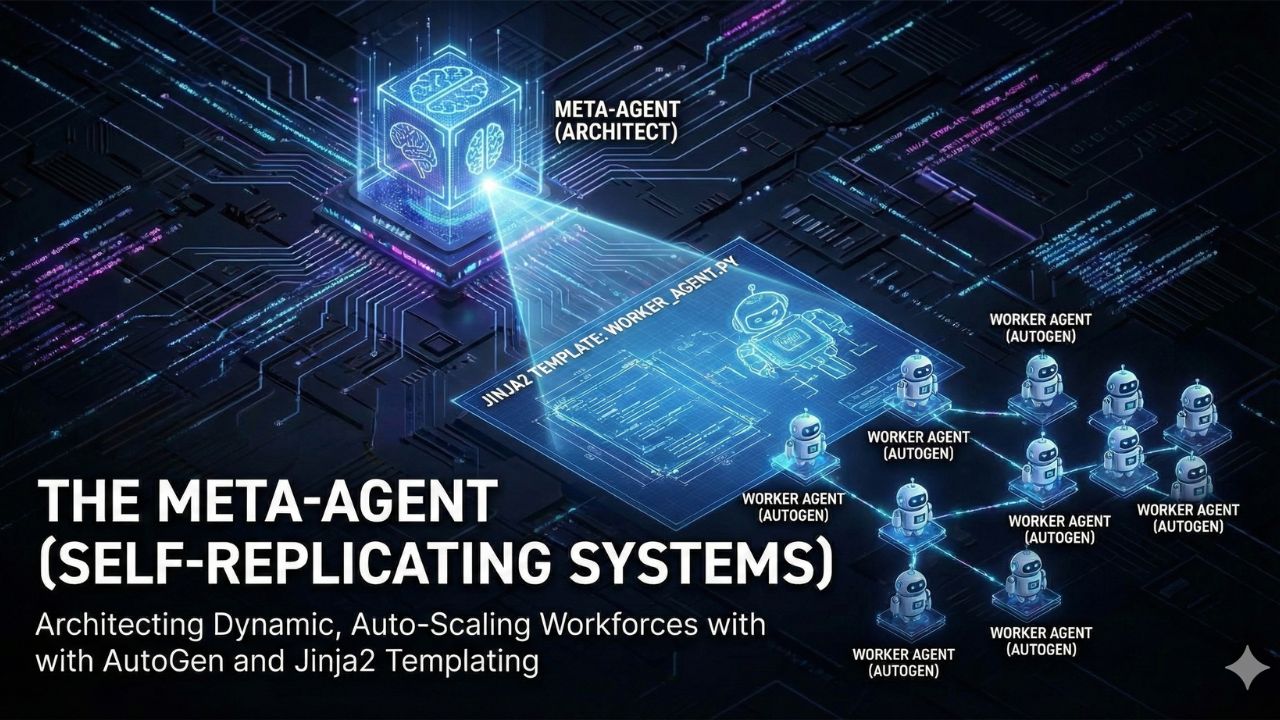
The Design Challenge: Using AutoGen to create an agent capable of writing the configuration files for other agents.
Recommended Stack: Meta-Prompting + Jinja2 Templating + AutoGen.
The Future: Conceptualizing systems that scale their own workforce based on ticket volume.
Author: AgileWoW Team
Category: Advanced AI Architecture / AutoGen
Read Time: 15 Minutes
Parent Guide: The Agentic AI Engineering Handbook
Most multi-agent systems are "Static Teams." You hardcode a Researcher, a Writer, and an Editor. But what if the task is too big for three agents? What if you need 50 researchers for one hour, and then zero?
The Meta-Agent is a Tier 4 architecture pattern. It is an AI system designed to spawn other AI systems. Instead of solving the task itself, the Meta-Agent analyzes the problem, designs a custom workforce to solve it, generates their configuration code, and spins them up. It is the "Factory Manager" of the AI world.
1. The Design Challenge: The Static Bottleneck
Hardcoded agent teams are brittle. A generic "Customer Service Team" might struggle when hit with a specialized technical outage because it lacks a "Network Engineer" persona.
The Solution: Dynamic Instantiation. We need a system that can:
- Analyze the incoming ticket (e.g., "Server 500 Error").
- Decide which agents are needed (e.g., "Database Admin" + "Sysadmin").
- Generate the Python code to instantiate those specific agents.
- Execute the workflow.
2. The Tech Stack Selection
To enable agents to write agents, we need robust templating and orchestration tools.
| Component | Choice | Why? |
|---|---|---|
| Orchestrator | AutoGen | Its modular design allows for programmatic creation of AssistantAgent and GroupChat objects on the fly. |
| Templating | Jinja2 | Allows us to create "Skeleton Agents" (templates) that the Meta-Agent fills with specific system prompts. |
| Strategy | Meta-Prompting | The technique of asking an LLM to generate the system instructions for another LLM. |
3. Architecture Deep Dive: The "Agent Factory"
3.1 The Factory Workflow
The Meta-Agent doesn't do the work; it builds the team.
- The Architect (Meta-Agent): Receives a vague user goal (e.g., "Research the history of coffee and write a blog").
- The Blueprinting: The Architect determines it needs:
- Agent A: Historian (Focus: Origins).
- Agent B: Agriculturalist (Focus: Farming).
- Agent C: Writer (Focus: Blog format).
- The Fabrication: The Architect uses Jinja2 to inject specific system prompts into a generic AutoGen wrapper.
- The Deployment: The system registers these new agents into a temporary GroupChat and kicks off the conversation.
3.2 The Jinja2 Template
We don't write agent code from scratch; we fill in the blanks.
# agent_template.py.j2
agent = AssistantAgent(
    name="{{ agent_name }}",
    system_message="""
    You are a {{ role }}.
    Your specific goal is: {{ goal }}.
    You interact with the team by {{ interaction_style }}.
    """,
    llm_config=llm_config
)
4. Implementation Guide (AutoGen)
Phase 1: The Meta-Prompt
We ask the LLM to output a JSON list of agents needed for the task.
# The Architect's Brain
meta_system_msg = """
You are a Team Lead. Analyze the user's request.
Return a JSON list of 3 specialized agents needed to solve this.
For each agent, provide: 'name', 'role', and 'system_message'.
"""
Phase 2: The Spawner Logic
We parse the JSON and loop through it to create objects.
import autogen
from jinja2 import Template

# 1. Get Agent Definitions from the Architect
response = architect_agent.generate_reply(messages=[{"role": "user", "content": task}])
agent_specs = json.loads(response) # List of dicts

# 2. Spawn Agents
dynamic_agents = []
for spec in agent_specs:
    new_agent = autogen.AssistantAgent(
        name=spec['name'],
        system_message=spec['system_message'],
        llm_config=llm_config
    )
    dynamic_agents.append(new_agent)

# 3. Create Group Chat
groupchat = autogen.GroupChat(agents=dynamic_agents, messages=[], max_round=10)
manager = autogen.GroupChatManager(groupchat=groupchat)
5. Use Cases for Self-Scaling Systems
- Elastic Customer Support: A "Triage Agent" analyzes ticket volume. If 500 tickets arrive about "Login Issues," it spawns 10 identical "Login Specialist" agents to handle the load in parallel.
- Complex Software Migration: When asked to "Migrate this codebase to Python 3," the Meta-Agent spawns one sub-agent for every single file in the repository to work in parallel, rather than one agent doing it sequentially.
- Dynamic Red Teaming: A security Meta-Agent analyzes an application and spawns specific attacker personas (e.g., "SQL Injection Bot", "Social Engineer") tailored to the target's specific tech stack.
6. Frequently Asked Questions (FAQ)
A: It can be. Spawning 10 agents means 10x the API calls. However, for time-sensitive or massive tasks (like data migration), the speed gain from parallelism often outweighs the token cost.
A: You must enforce a max_round limit on the dynamically created GroupChat. Additionally, the Meta-Agent should include a "Supervisor" in the generated team whose only job is to terminate the chat when the goal is met.
A: Yes. You can serialize the agent configurations (JSON) to a database. If the same task type appears again, you can "hydrate" the team from the database instead of asking the Meta-Agent to redesign it.

7. Sources & References
Open Source Resources:
Frameworks
- AutoGen Documentation: Dynamic Group Chats – Official guides on modifying group members at runtime.
- Jinja2 Docs: Template Designer Documentation – How to build robust Python templates.
Theory
- Meta-Prompting Paper: Stanford Research – Techniques for using LLMs to improve other LLMs.
- Agent Swarm Patterns: OpenAI Cookbook – Strategies for managing multi-agent hierarchies.