The Digital Butler: How to Build Your "AI-OS" for Home & Admin

Does your brain feel like a browser with 50 tabs open?
Between the "what’s for dinner?" panic at 5 PM, the forgotten field trip forms, and the mental math of monthly budgeting, the cognitive load of running a modern home is exhausting.
This isn't just about chores; it's about the invisible labour that drains your energy.
Welcome to the "Admin" layer of your AI Life Operating System (AI-OS).
It’s time to hire your Digital Butler. We aren't talking about physical robots folding laundry (yet). We are talking about smart, agentic AI tools that act as your household’s Chief of Staff, removing the friction of daily logistics so you can finally reclaim your sanity.
Here is how to deploy AI for household management and turn chaos into a synchronized system.
Explore the AI Life Operating System Hub
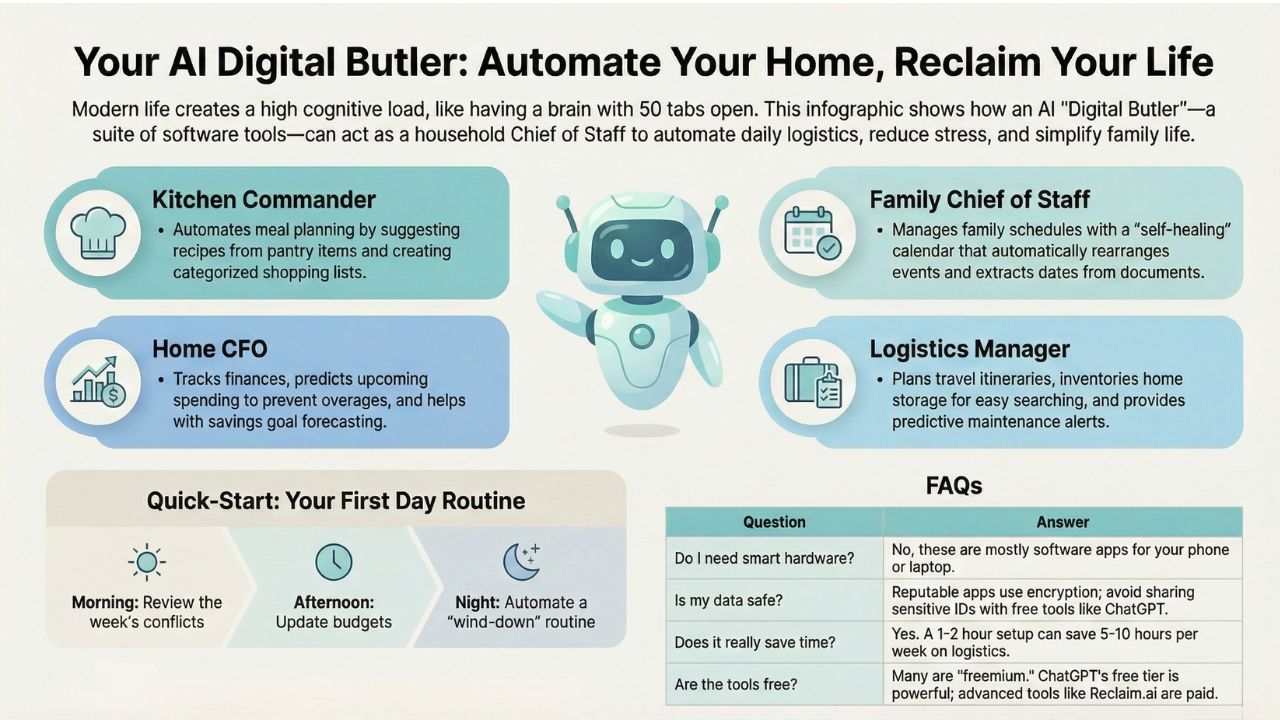
1. The Kitchen Commander: AI Meal Planning for Families
The most repetitive stressor in family life is feeding everyone, every single day. Stop treating it like a daily emergency and automate it.
The Old Way: Staring into the fridge, scrolling Pinterest for hours, and ordering takeout out of frustration.
The AI-OS Way: AI meal planning for families that "learns" your tastes.
- Automate Grocery List with AI: Tools like DishGen or FoodiePrep can scan your pantry ingredients via photo and instantly suggest recipes.
- Meal Prep Prompt Engineering: Use ChatGPT for household chores with a specific prompt:
"Act as a professional chef. Plan a week of dinners for a family of four. We have chicken, rice, and broccoli in the fridge. One child hates mushrooms. Generate a shopping list for the missing items categorized by aisle."
Result: You get a full plan and a list in seconds, drastically reducing mental load for parents.
2. The Family Chief of Staff: AI Family Calendar Management
Coordinating soccer practice, dentist appointments, and work meetings requires military-grade precision. Let AI handle the traffic control.
The Concept: A "Self-Healing" Calendar.
- AI Family Calendar Management: Apps like Reclaim.ai or Motion don't just record events; they defend your time. If a meeting runs late, they automatically reshuffle your "focus time" or "home admin" blocks.
- AI for Co-parenting Communication: Instead of endless text threads, use family logistics AI software to centralize schedules. You can even paste a messy school newsletter into an AI chatbot and ask it to "Extract all dates and add them to a .csv file for Google Calendar," enabling automated appointment scheduling personal and stress-free.
3. The Home CFO: Personal Finance AI Analysis
Budgeting often fails because it’s backward-looking (tracking what you already spent). Your Digital Butler is forward-looking.
- Using AI for Budget Tracking: Modern apps (like YNAB AI or Rocket Money) use personal finance AI analysis to predict upcoming recurring bills and warn you before you overspend.
- Scenario Planning: Ask your AI: "If we save $400 a month for a renovation, when can we afford the new kitchen?" This moves you from "panic mode" to strategic decision-making.
4. The Logistics Manager: Travel & Home Organization
From vacation planning to finding that one cable you bought three years ago, AI is your ultimate organizer.
- Travel Planning with AI Agents: Forget opening 20 tabs to compare flights. AI agents can now draft entire itineraries based on vague requests like "Plan a 3-day trip to Kyoto, kid-friendly, under $2000, focused on nature."
- Inventory Management for Home AI: Decluttering home with AI tips is rising in 2025. Take photos of your storage boxes. AI can index them so you can ask, "Where did I put the winter coats?" and it will tell you exactly which bin they are in.
- Predictive Home Maintenance: Smart home devices can now alert you to leaks or filter changes before they become disasters.
5. The Mental Load: AI for Reducing Mental Load
Perhaps the biggest benefit of the Digital Butler is reducing mental load for parents and homeowners.
- Home Inventory: Use inventory management for home AI to track what you have in your pantry or garage. No more buying batteries when you already have three packs.
- Maintenance: Predictive AI can help with predictive home maintenance, reminding you to change air filters or service the boiler before it breaks.
- Routine: You can optimize daily routine with AI by asking it to structure your morning for maximum efficiency.
Quick-Start: Your "Digital Butler" Routine
Ready to optimize daily routine with AI? Start this Sunday:
- Morning: Ask your AI lifestyle assistant (ChatGPT/Gemini) to review your week and flag overlapping commitments.
- Afternoon: Paste your grocery receipts into an AI tool to track spending and update your pantry inventory.
- Evening: Use smart home automation ideas 2025 to trigger a "wind-down" routine (dim lights, adjust thermostat) automatically.
The Bottom Line
The goal of AI home automation tools isn't to make you a robot; it's to free you to be human. By offloading the logistics, chores, and family management to an AI, you reclaim your time.
Start small. Maybe just ChatGPT for household chores lists or a simple meal planner. Once you trust your AI digital butler, you will wonder how you ever managed the chaos without it.

Frequently Asked Questions (FAQ)
Not necessarily. While smart speakers help with voice commands, the "Digital Butler" tools mentioned here (like Reclaim.ai or DishGen) are primarily software apps you use on your phone or laptop. They focus on planning rather than controlling lights or locks.
Privacy is critical. Most reputable apps (like YNAB or Reclaim.ai) use bank-grade encryption and do not sell your personal data. However, for free tools like ChatGPT, avoid inputting sensitive ID numbers (like SSNs) or passwords. Always check the "Data Privacy" section of any new app you download.
The initial setup takes about 1-2 hours (syncing calendars, inputting pantry items). After that, users report saving 5–10 hours per week on logistics. The goal is to set it and forget it.
Many offer "Freemium" models. Free: ChatGPT (basic), DishGen (basic), Google Calendar. Paid: Reclaim.ai (advanced features), YNAB (subscription).