Create Your Own AI Influencer: A Guide to Virtual Beings

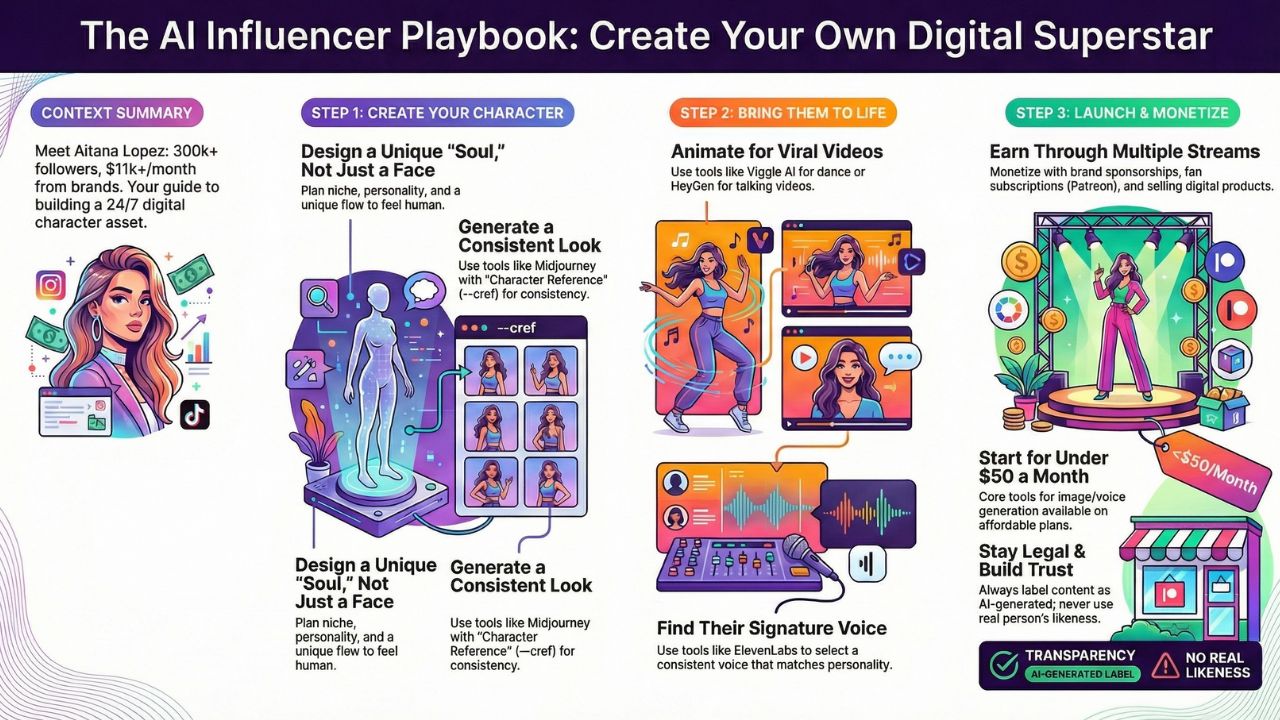
Meet Aitana Lopez. She has pink hair, over 300,000 Instagram followers, and earns over $11,000 a month. Brands like Victoria's Secret and Olaplex pay her to wear their clothes.
But here is the catch: Aitana is not real. She is a Virtual Influencer created by a computer.
In 2026, you don't need to be born with perfect genes to be a model. You don't even need to leave your house. You just need to build a digital superstar.
This guide is your complete virtual influencer tutorial. We will teach you how to create a character who works 24/7, never ages, and prints money while you sleep.
Explore the AI Creator Studio
Why Build a Virtual Influencer?
Real influencers are human. They get tired. They get sick. They have scandals that ruin their careers. AI Models are the perfect employees.
- Zero Travel Costs: Want a photo in Paris? You don't need a plane ticket. You just type a prompt.
- Unlimited Content: A human can only do one photoshoot a day. An AI can do 500.
- Total Control: You decide exactly what they say, wear, and do. No arguments.
This is why brands love them. If you can master consistent character generation AI, you are building a business asset that can last for years.
Step 1: The "Soul" (Design Your Character)
Before you open any software, you need a plan. If you just generate "pretty girl," you will fail. There are millions of pretty AI girls. You need a Personality.
Create a "Character Sheet" like this:
- Name: Luna Tech
- Age: 24
- Ethnicity: Mixed (Brazilian/Japanese) - Unique looks stand out.
- Niche: "The Gamer Girl who loves Crypto."
- Vibe: Sassy, smart, wears neon colors.
- Flaw: She is clumsy. Giving your AI a "flaw" makes them feel more human.
Pro Tip: Look at the Aitana Lopez case study. Her creators (The Clueless Agency) didn't just make her pretty; they gave her a story. She is a "fitness enthusiast" and a "gamer." This allows them to sell gym clothes and video games.
Step 2: The Face (The Secret to Consistency)
The hardest part of AI is Consistency. If your character has blue eyes in one photo and brown eyes in the next, people will know she is fake. You need her to look exactly the same in every single post.
The Best Tool: Midjourney (using the "Character Reference" feature).
The Step-by-Step Workflow:
- Generate the "Master" Image: Spend time creating the perfect portrait.
Prompt: A hyper-realistic photo of a 24-year-old Brazilian-Japanese woman with pink hair, freckles, neon jacket, soft lighting, 8k --ar 9:16.
- Save the Image URL: Once you have the perfect face, right-click and copy the image link.
- Use the --cref Tag: This is the magic command. Whenever you generate a new image, add
--cref [URL]at the end.New Prompt: A photo of [Subject] eating pizza in New York, street photography --cref https://www.computerweekly.com/de/definition/Golden-Image-auch-Master-Image-oder-Goldenes-Abbild --cw 100
(Note: --cw 100 tells the AI to copy the face AND the clothes. --cw 0 copies only the face.)
Alternative Tool: If you want more technical control, you can use Flux (a newer model) which is excellent at keeping faces consistent without complex prompting.
Step 3: The Movement (Animate for TikTok)
Photos are great for Instagram, but TikTok is where you go viral. To grow fast, your character needs to move and dance. Here is how to animate AI characters for TikTok:
Method A: The "Talking Head" (Easy)
- Tool: HeyGen or Hedra.
- How: Upload a still photo of your character. Then, upload a voice recording (or type text). The AI will animate her face, making her lips move perfectly in sync with the audio.
- Best For: Storytime videos, news updates, and advice.
Method B: The "Body Double" (Advanced)
- Tool: Viggle AI.
- How: Record a video of yourself dancing in your living room. Upload your character's photo to Viggle. Viggle will "paste" your character over your body. You dance -> She dances.
- Best For: Viral dance trends and fashion walks.
Step 4: The Voice (Give Her a Soul)
Your character needs a voice that matches her face. If she looks like a teenager but sounds like a robot, it won't work.
Tool: ElevenLabs.
Setup: Go to the "Voice Library." Listen to hundreds of voices.
The Secret: Once you pick a voice (e.g., "Sarah - Young American"), click "Add to Lab." Never change the settings. You want her to sound exactly the same in every video so fans recognize her voice instantly.
Step 5: How to Monetize Virtual Influencers
You have built the model. You have the followers. Now, where is the money?
- Brand Sponsorships (The Big League): This is how Aitana makes $11k/month. Once you hit 10,000 followers, brands will treat you like a real influencer.
Pitch: "My character Luna reaches 50,000 Gen-Z gamers. Send me your new headset, and she will wear it in her next 3 posts." - Fan Subscriptions (FanVue / Patreon): Many virtual influencers earn money by selling exclusive content.
Offer: "Sign up for $5/month to see Luna's travel diary or get a personalized birthday video message." - Digital Products: Since your character is digital, she can sell digital goods.
Sell "Lightroom Presets" (filters) so fans can edit their photos to look like her.
Sell "Merchandise" (T-shirts/Hoodies) with her face on them.
Frequently Asked Questions (FAQs)
Yes, it is 100% legal. However, you must be honest. On Instagram and TikTok, you should use the "AI Generated" label or write "Virtual Being" in the bio. Transparency builds trust.
You can start very cheaply. Midjourney is ~$30/month (for image generation), and ElevenLabs is ~$5/month (for voice). Instagram and TikTok are free. Total: Under $50/month to run a business that can earn thousands.
Absolutely Not. You cannot make an AI version of Taylor Swift or Zendaya. That is identity theft and you will get sued. You must create a unique face that does not exist in the real world.
Algorithms love consistency. For Instagram, post 1 photo per day (Stories are crucial!). For TikTok, aim for 3–5 short videos per week.