What is an NPU? Why Your Next Laptop Needs 45+ TOPS for AI
Before you drop money on a new rig in 2026, you need to understand the new metric that matters.
For the last decade, we obsessed over CPU clock speeds (GHz) and GPU memory (VRAM). But in 2026, the game has changed. There is a new kingmaker in town: TOPS (Trillions of Operations Per Second).
If you buy a laptop today without looking at this number, you are buying a machine that is obsolete the moment you open the box.
The traditional CPU is great for logic (opening apps, running Excel). The GPU is a beast for graphics and heavy training (rendering video, gaming). But for the day-to-day "thinking" of an AI, summarizing your emails, generating code snippets in real-time, or running a local voice assistant, you need a Neural Processing Unit (NPU).
The NPU is the brain's reflex system. It allows your laptop to run persistent AI agents in the background without draining your battery in an hour.
Explore The AI PC & Hardware Hub
Part 1: The Analogy- CPU vs. GPU vs. NPU
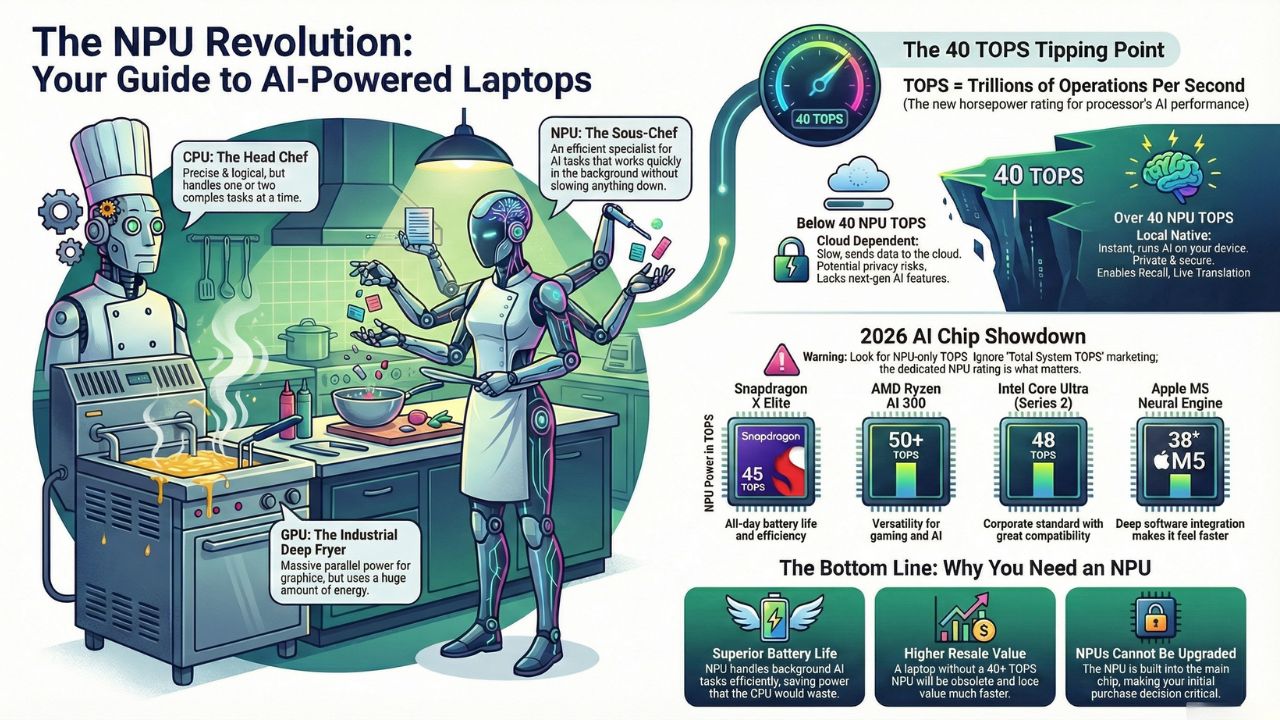
To understand why you need an NPU, think of your computer like a busy professional kitchen.
1. The CPU is the Head Chef
Role: The Executive Chef.
Strength: Highly skilled, precise, and logical. Can handle complex recipes (logic) perfectly.
Weakness: Can only do one or two things at a time. If you ask the Chef to chop 1,000 onions, the whole kitchen stops.
2. The GPU is the Industrial Deep Fryer
Role: Heavy Machinery.
Strength: Massive power. It can cook 1,000 french fries (pixels or data points) simultaneously.
Weakness: It is hot, loud, and uses a massive amount of gas (battery). You wouldn't turn on the deep fryer just to toast a single slice of bread.
3. The NPU is the Sous-Chef
Role: The Specialist.
Strength: Speed and Efficiency. It can chop vegetables (matrix math for AI) incredibly fast using very little energy.
Why it matters: In 2026, your OS is constantly "chopping vegetables", blurring your background on calls, listening for voice commands, and indexing your files.
Without an NPU: The Head Chef (CPU) has to do it, slowing down your computer.
With an NPU: The Sous-Chef handles it silently in the background, leaving the Chef free to run your apps.
Part 2: What is TOPS? (And Why 45 is the Magic Number)
TOPS stands for Trillions of Operations Per Second. It is the horsepower rating for AI.
In the past, Microsoft and Apple didn't care about this number. But with the launch of Windows Copilot+, they drew a line in the sand: 40 TOPS.
The "40 TOPS" Cliff
- Under 40 TOPS: Your laptop is "Cloud Dependent." If you ask it to summarize a document or find a lost file using AI, it has to upload your data to a server, process it, and send it back. This is slow, drains data, and is a privacy risk.
- Over 40 TOPS: Your laptop is "Local Native." It can run models like Gemini Nano or Phi-3 directly on the silicon.
This enables features like:
- Recall: Instantly finding a document you saw 3 weeks ago just by describing it.
- Live Translation: Real-time subtitles for any video in any language.
- Zero-Latency Coding: Autocomplete for Python/JS that happens faster than you can type.
Warning: Be careful of marketing terms like "Total System TOPS." Intel and AMD sometimes add the CPU+GPU+NPU together to get a high number (e.g., "100 Platform TOPS"). Always look for the NPU-only TOPS rating.
Part 3: The 2026 Chip Comparison Table
Here is how the major players stack up in the 2026 landscape.
| Chip Family | NPU Power (TOPS) | Best For... | The Vibe |
|---|---|---|---|
| Snapdragon X Elite | 45 TOPS | Efficiency | The battery life king. It runs Windows on Arm, staying cool and quiet while running AI tasks all day. |
| AMD Ryzen AI 300 | 50+ TOPS | Versatility | The gamer's choice. It pairs a massive NPU with powerful Radeon graphics. |
| Intel Core Ultra (Series 2) | 48 TOPS | Safety | The corporate standard. Excellent compatibility with legacy x86 apps and solid AI performance. |
| Apple M5 Neural Engine | 38 TOPS* | Integration | Don't let the number fool you. Apple's tight software integration makes 38 TOPS feel faster than 50 TOPS on Windows. |
Part 4: Do I Really Need This? (Buying Advice)
You might be thinking, "I just browse the web and write documents. Do I need an NPU?"
In 2026, the answer is Yes, for two reasons:
1. Battery Life
Even if you don't use "AI Chatbots," your computer does. Windows 11 and macOS use AI for video conferencing (camera framing), security scanning, and memory management. If you don't have an NPU, your CPU has to do this work, which eats your battery. An NPU laptop simply lasts longer.
2. Resale Value
We are in a hardware transition as big as the move from DVD drives to streaming. A laptop without a 40+ TOPS NPU bought in 2026 will be nearly unsellable in 2028 because it won't support the next generation of OS features.
Frequently Asked Questions (FAQs)
No. Unlike RAM or an SSD, the NPU is physically built into the main processor (SoC). You cannot add one later. This is why buying the right chip now is critical.
Indirectly, yes. Future games (late 2026/2027) are starting to use NPUs for "Smart NPCs", non-player characters that can talk to you dynamically without burdening the graphics card. Currently, it mostly helps by handling background streaming software (like OBS) without lowering your frame rates.
It is enough for the quantized (compressed) version. You can run Llama-4-8B comfortably on a 45 TOPS NPU. For the massive 70B models, you still need a dedicated NVIDIA GPU.