Flow State Engineering: How to Code 10x Faster Without Burnout

Key Takeaways
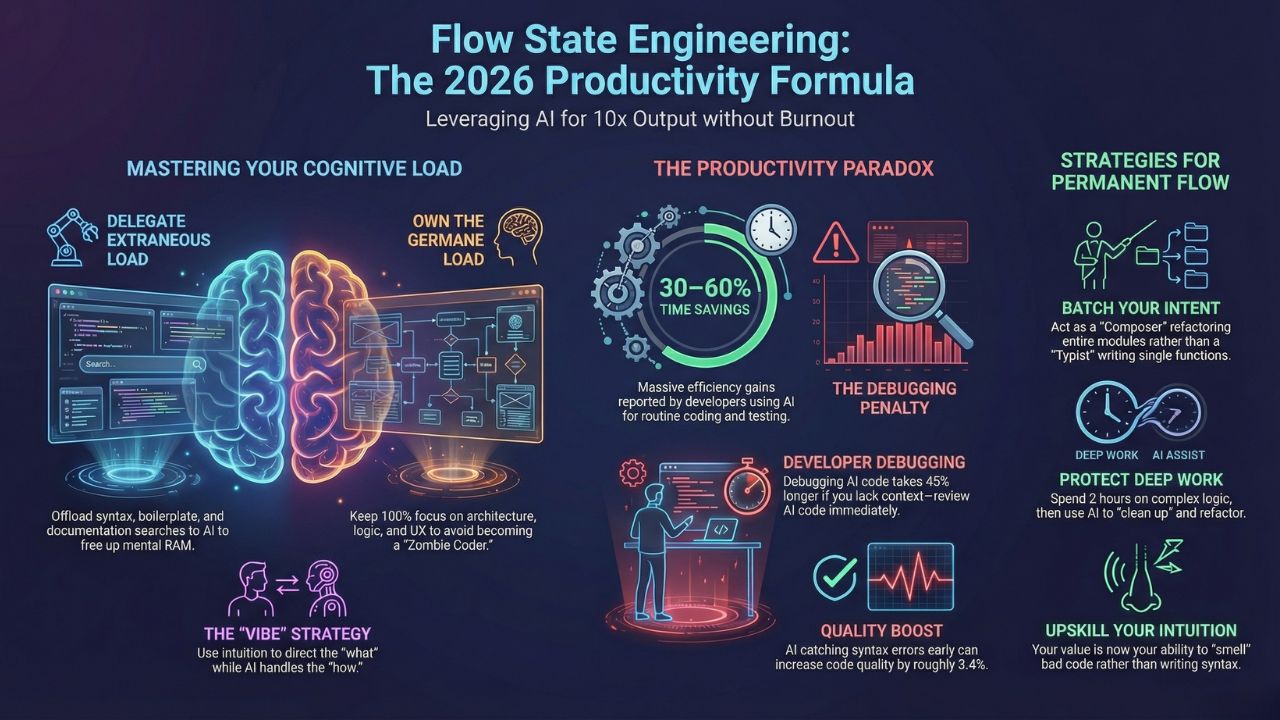
- The Goal: Use AI to eliminate "Extraneous Cognitive Load" (syntax, boilerplate, regex) so you can focus 100% on "Germane Load" (architecture, logic, user experience).
- The Result: Developers using AI for "toil" report saving 30–60% of their coding time.
- The Warning: Relying on AI for logic without review increases debugging time by 45%. Flow requires supervision, not abdication.
Quick Answer: The 2026 Productivity Formula
"Flow" used to be accidental. You’d put on your headphones, ignore Slack, and hope for a good day. In 2026, we don't hope for flow; we engineer it.
This guide is part of our extensive guide on Vibe Coding 101: How AI is Replacing Syntax with Intuition in 2026. While the main guide covers the what, this page covers the how, specifically, how to use tools like Cursor and Copilot to protect your brain from burnout while delivering 10x output.
The Science of "Vibe": Reducing Cognitive Load
The human brain has a strict limit on working memory. In software engineering, "burnout" rarely comes from working too many hours; it comes from Cognitive Overload, juggling too many syntax rules, file paths, and documentation tabs at once.
The Two Types of Load You Must Manage
To master Flow State Engineering, you must distinguish between two types of mental effort:
Extraneous Load (The Enemy): Mental effort spent on "how" to do something. Examples include remembering the Regex for an email validator, looking up AWS SDK syntax, or manually typing boilerplate React components.
AI Strategy: Delegate 100% of this. AI tools now handle boilerplate and documentation search, freeing up your mental RAM.
Germane Load (The "Vibe"): Mental effort spent on "what" to build. Examples include designing a scalable database schema, handling edge cases in user auth, or optimizing the "feel" of a UI animation.
AI Strategy: Keep this. This is where your value lies. If you automate this, you become a "Zombie Coder" who doesn't understand their own system.
The "10x" Reality: Speed vs. The Debugging Trap
New data from 2025 reveals a paradox in AI productivity. While AI boosts raw coding speed, it introduces a new bottleneck if managed poorly.
The Good News
Massive Time Savings: Developers report saving 30–60% of their time on routine coding and testing tasks.
Quality Boost: Code quality can actually increase by roughly 3.4% because AI catches syntax errors and type mismatches instantly.
The Bad News (The Trap)
The "Almost Right" Problem: 66% of developers report frustration with AI solutions that look correct but fail in edge cases.
The Debugging Penalty: Debugging AI-generated code takes 45% longer than debugging human code because you lack the mental context of having written it line-by-line.
Key Takeaway: To maintain flow, you must treat AI code as a junior dev's PR. Review it immediately. If you accept code you don't understand, you aren't "Vibe Coding", you are creating technical debt.
Strategies to Engineer a Permanent Flow State
1. The "Composer" Batching Method
Instead of context-switching every 5 minutes to write a function, use features like Cursor's Composer to batch your intent.
Don't: Ask AI to "write a function."
Do: Ask AI to "Refactor the entire Auth module to use the new session token format across these 3 files."
Why: This keeps you in the "Architect" role (high level) rather than the "Typist" role.
2. Protect Your "Deep Work" Blocks
DORA 2025 reports indicate that while AI adoption increases the number of tasks (contexts) a developer handles by 9%, it doesn't necessarily increase stress if the developer maintains control.
Block out 2 hours where you only do architectural review or complex logic. Use AI to "clean up" after you. Write the messy logic yourself to establish the "vibe," then ask AI to refactor and typesafe it.
3. Upskill Your Intuition
As we discuss in Is Syntax Dead? Why Junior Devs Need to Master "Vibe" Over Logic , your ability to smell bad code is now more important than your ability to write good code. You cannot remain in a flow state if you are constantly second-guessing the AI's output.
Conclusion: Burnout is Optional
Burnout happens when you fight the tools. Flow happens when you direct them. By 2026, the most successful engineers are not the ones who type the fastest, but the ones who can sustain the longest periods of high-level creative thought.
Use AI to clear the path, but never let it choose the destination.

Frequently Asked Questions (FAQ)
Not necessarily. Research suggests that while AI reduces critical thinking if used blindly, it can actually increase job satisfaction and reduce burnout when used to remove "toilsome" work. The key is to use the extra brainpower for harder problems, not to zone out.
Because you didn't write it. When you write code, you build a mental map of its logic. When AI writes it, you have to reverse-engineer that map before you can fix it. This "context loading" is mentally expensive.
Yes, but with guardrails. For complex distributed systems, "Vibe Coding" is best used for individual components. Never rely on "vibes" for security protocols or financial transactions, audit those lines strictly.
Sources & References
- Vibe Coding 101: How AI is Replacing Syntax with Intuition in 2026
- Is Syntax Dead? Why Junior Devs Need to Master "Vibe" Over Logic
- Official GitHub Repository: Vibe Coding & Flow State Engineering Playbook
- Stack Overflow: 2025 Stack Overflow Developer Survey.
- Dora.dev: How gen AI affects the value of development work (2025 DORA Report).
- GitHub: Octoverse 2025: The State of Open Source and AI.
Internal Resources:
External References: