Stop Playing, Start Building: Create a 3D RPG with Zero Code
What's New in This Update (May 2026)
- Expanded Engine Reviews: We updated our framework analysis to reflect Unity Muse's latest behavior-tree generator and Godot's GD-Copilot multi-file contextual updates.
- New 3D Asset Generators: Added workflows for Luma AI and Polycam, demonstrating how Gaussian Splatting allows you to scan real-world objects into your RPG seamlessly.
- Agentic Debugging: Included a brand-new section covering how to troubleshoot broken AI logic using agentic coding principles instead of manual syntax hunting.
Key Takeaways
- The barrier to entry for game development is gone. You no longer need to master C# or C++ to build and publish a fully functioning 3D role-playing game.
- Tools like Unity Muse and Godot AI allow you to generate complex character logic and behavior trees strictly through natural language prompts.
- You can generate 3D models, terrains, and textures instantly using text-to-3D platforms like Meshy.ai, completely bypassing manual software like Blender.
- To succeed as a no-code developer, you must shift your mindset from "Writer" to "Editor," focusing on logic orchestration and playtesting rather than manual syntax.
The "Developer" Title is No Longer Reserved for Coders.
In 2023, if you wanted to make a video game, you had to endure a brutal learning curve. You had to learn complex syntax in C# or C++, memorize mathematical vectors, and spend years studying the interface of Unity or Unreal Engine.
In 2026, that barrier to entry has completely vanished.
We have firmly entered the era of Text-to-Game. A new wave of generative, no-code AI game engines allows you to construct sprawling 3D RPGs simply by typing descriptive sentences. If you can write a compelling story and logically describe how a world should function, you can build a video game.
This guide serves as your comprehensive roadmap to becoming a game developer in 24 hours, utilizing the absolute best AI game development tools available for beginners today.
Explore AI Gaming 2026 Hub
- AI Gaming World: Infinite Play & Generative Worlds
- Can Your NPU Run GTA 6? The Reality of Local AI Gaming
- Nvidia ACE vs. AMD Ryzen AI: Who Wins the Battle for Smart NPCs?
- Best AI Gaming Laptops 2026: Benchmarked & Ranked
- Cloud Gaming vs. Edge AI: Do You Need an RTX 5090?
- Top 10 Games with Sentient AI NPCs You Can Talk To (2026 Edition)
- Roblox vs. Fortnite Creative: Which AI Map Generator is Better?
- The Death of the Grind: How AI Agents are Farm-Botting for You Legally
- VR + AI: Creating 'Holodeck' Experiences in Your Living Room
- How to Use Midjourney & Sora to Create Game Assets
- Monetizing AI Mods: Sell Generative Levels & Skins
Step 1: Choose Your Engine (Unity Muse vs. Godot AI)
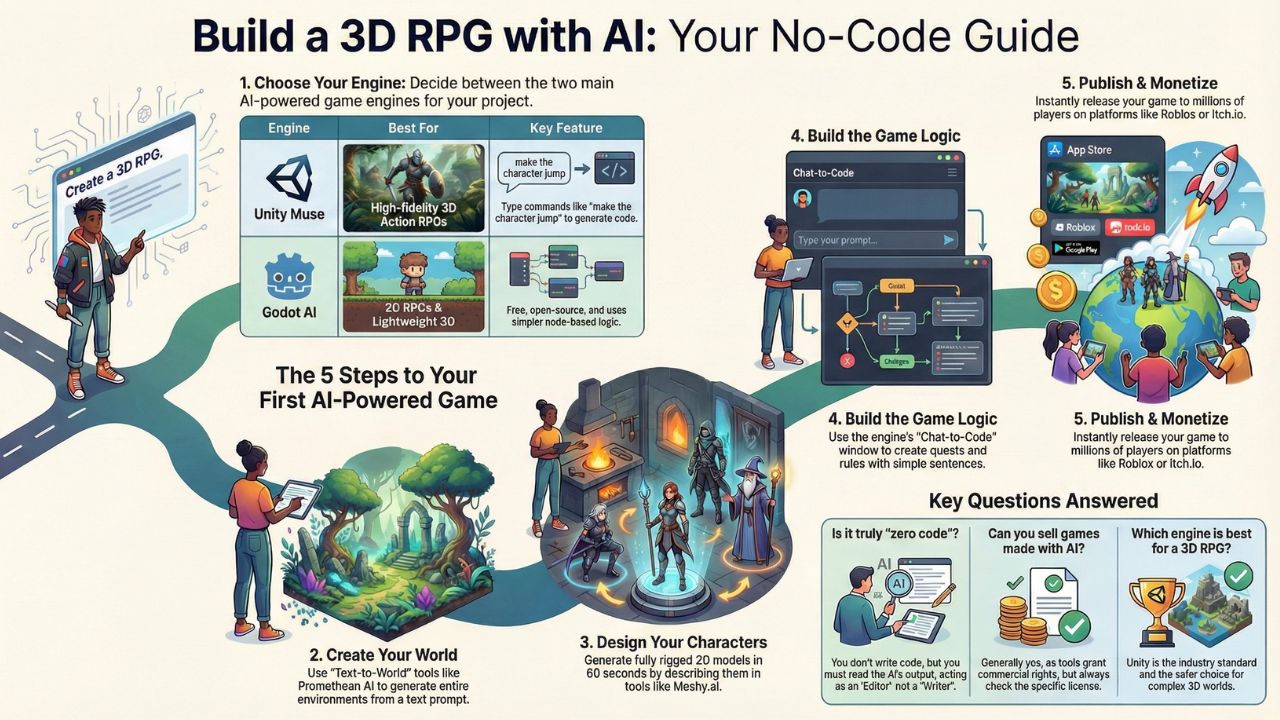
The first critical decision every creator makes is selecting the foundational architecture for their project. In 2026, the two dominant heavyweights offering robust, no-code integrations are Unity Muse and the open-source champion, Godot AI.
Option A: Unity Muse (The Powerhouse)
Best For: 3D Action RPGs, High-Fidelity Graphics, and complex physics.
Unity has seamlessly integrated "Muse," an advanced AI assistant that lives directly inside the development editor. The learning curve drops dramatically because you do not need to hunt through menus.
How it works: You type natural language commands. For instance, you input: "Make the main character jump when I press the Spacebar. If the player holds the Spacebar for two seconds, initiate a flying sequence."
Muse instantly parses this intent, generates the required C# script, and attaches the rigid body components automatically.
The "Behavior" Feature: Describing enemy AI is now conversational. You simply type: "The goblin should patrol this waypoint path. If he detects the player within 10 meters, he should trigger a scream audio file and charge." Muse builds the underlying behavior tree and state machine without you touching a single line of logic.
Option B: Godot AI (The Open Source Hero)
Best For: 2D RPGs, Lightweight 3D Games, and indie developers on a strict budget.
Godot has skyrocketed in popularity because it is completely free, open-source, and charges zero royalties regardless of how much money your game makes. Its new "GD-Copilot" plugin is an incredible asset for beginners.
Why choose it: Beyond the price tag, Godot utilizes a "Node-based" architectural logic. It reads more like a visual flowchart, which many non-technical creators find far easier to comprehend than Unity's complex component-based system.
The Verdict: If your vision aligns closer to a stylized, top-down game like Pokemon or Stardew Valley, Godot is your best bet. If you want to build a sprawling, physics-heavy experience reminiscent of Dark Souls, choose Unity.
Step 2: Create Your World (Text-to-World)
Once you select an engine, you must populate the environment. Historically, level designers spent hundreds of hours manually sculpting terrain, placing individual rocks, and painting textures.
Today, you leverage text-to-world generator tools. If you are debating between platforms like Roblox and Fortnite Creative, you will notice these generative features are becoming standard everywhere.
The Tool: Promethean AI
Open the Prompt Window: Instead of opening a terrain brush, you type a scene description: "Generate a dark fantasy pine forest. Add ancient, crumbling ruins covered in dense moss on the left. Place a foggy, winding river cutting through the center."
Watch it Build: The AI references its spatial awareness library and spawns thousands of procedurally generated trees, rocks, and ruins in seconds, placing them logically (e.g., trees do not spawn underwater).
Refine via Chat: If the atmosphere feels incorrect, you iterate conversationally: "Change all the pine trees to dead, leafless oaks and darken the sky." The environment updates instantly.
Pro Tip (Gaussian Splatting): Use mobile applications like Luma AI or Polycam to scan physical objects in your own home—like an interesting rock or a custom miniature—and import them directly into your digital world as hyper-realistic 3D assets.
Step 3: Create Your Characters (No 3D Modeling Required)
You do not need to spend six months learning Blender topology. You can create professional game assets with AIusing dedicated generative 3D tools like Meshy.ai or Rodin.
The Text-to-3D Workflow:
- Prompting (Meshy.ai): You input a specific character brief: "A futuristic cyborg samurai wearing tarnished armor and holding a glowing red katana, rendered in a low-poly PS1 style."
- Generation: Within 60 seconds, the AI outputs a fully textured, 360-degree 3D model.
- Exporting: You download the model as an .FBX or .GLTF file and drag it directly into your Unity or Godot project folder.
- Auto-Rigging & Animation: A static model cannot move. You upload the character into a tool like Mixamo (or use Unity's native AI Animator). The software automatically detects the character's joints (knees, elbows, spine) and applies a skeleton, allowing you to instantly attach walking, running, and combat animations.
Step 4: The Logic (Building the Game Loop)
A video game is not merely an art gallery; it requires rules, progression, and consequences. This technical hurdle is where 90% of beginners historically quit.
However, by adopting what the industry now calls agentic coding, you bypass the syntax entirely.
The "Chat-to-Code" Workflow: Instead of staring at a blank Visual Studio script, you open the AI Chat window integrated into your engine.
You: "I need a quest inventory system. When the player collides with the 'Golden Apple' object, the apple should disappear, a door object named 'DungeonGate' should open, and a success chime should play."
AI Assistant: Generates the complete, error-free script, handles the variable declarations, and instructs you exactly which objects in your scene to attach the logic to.
You (Iterating): "The dungeon gate opens too quickly, it feels unnatural. Make it swing open slowly over three seconds."
AI Assistant: Adjusts the script to include a localized timer and updates the code in real-time.
How to Handle Bugs (Agentic Debugging)
When you inevitably encounter an error (e.g., your character falls through the floor), you do not hunt for missing semicolons. You rely on vibe coding techniques. You copy the console error message, paste it back into your AI assistant, and ask: "Why is this happening, and how do I fix the collider?" The AI diagnoses the physics overlap and provides the solution.
Step 5: Publish & Monetize
You envisioned the world, generated the assets, and established the rules. Now, you must extract financial value from your creation. The new "Creator Economy" offers multiple avenues that bypass traditional gatekeepers like Steam.
- Roblox & Fortnite Creative: Publishing your RPG directly into these massive ecosystems grants you instant access to millions of active players. You monetize through engagement payouts—the platforms pay you dividends based on how much time players spend in your specific world.
- Selling Custom Assets: If you excel at generating unique 3D items, you can monetize AI game mods and skinsby selling your text-to-3D creations on asset stores or community marketplaces.
- Itch.io: Upload your standalone indie game directly, set your own price (or accept donations), and retain full creative control.
- Patreon / YouTube: Document your journey. Record "Devlogs" detailing exactly how you utilized AI prompts to bypass traditional development hurdles. A massive audience of aspiring creators will pay monthly subscriptions to access your specific prompt libraries and workflow tutorials.
Frequently Asked Questions (FAQ)
Technically, code is still being written, but you are not the one typing the syntax. Your role transitions from a manual programmer to a high-level logic orchestrator. You act as the Director, instructing the AI on what to build, and then functioning as an Editor to ensure the generated logic behaves correctly during playtesting.
Yes, the current legal and commercial frameworks generally support this. Major platforms like Unity Muse and Meshy explicitly grant commercial rights to the users generating the assets. However, it is always imperative to review the specific end-user licensing agreement (EULA) of the distinct AI tool you choose to ensure full ownership.
Unity remains the industry standard for 3D development. Its architecture handles complex lighting, rigid-body physics, and massive open-world environments significantly better out-of-the-box than Godot. For an immersive 3D RPG, Unity is the most reliable foundation.
You no longer need to write massive, branching dialogue trees. By integrating APIs from platforms like Inworld AI or deploying sentient AI NPCs, your characters use local language models to hold dynamic, unscripted conversations with the player via text or microphone.