Top 5 AI Legal Apps for Contract Review & Claims

Introduction: Why Hire a Lawyer When You Have AI?
If you are a freelancer or solopreneur, you know the fear: signing a 20-page contract you don't understand, or letting a client walk away with $5,000 because taking them to court costs $10,000.
In 2026, the legal landscape has flipped. You no longer need a $500/hour attorney for routine tasks.
New AI legal apps for contract review act as your "Digital General Counsel," spotting hidden traps in seconds. Whether you need to review a Non-Disclosure Agreement (NDA) or sue a non-paying client in small claims court, these tools are your first line of defense.
This is the "Shield" layer of your AI Fortress.
Explore the AI Wealth & Legal Defense Hub
The Top 5 AI Legal Tools for 2026
We tested the best AI legal apps for contract review to find the ones that actually work for solopreneurs (not just big law firms).
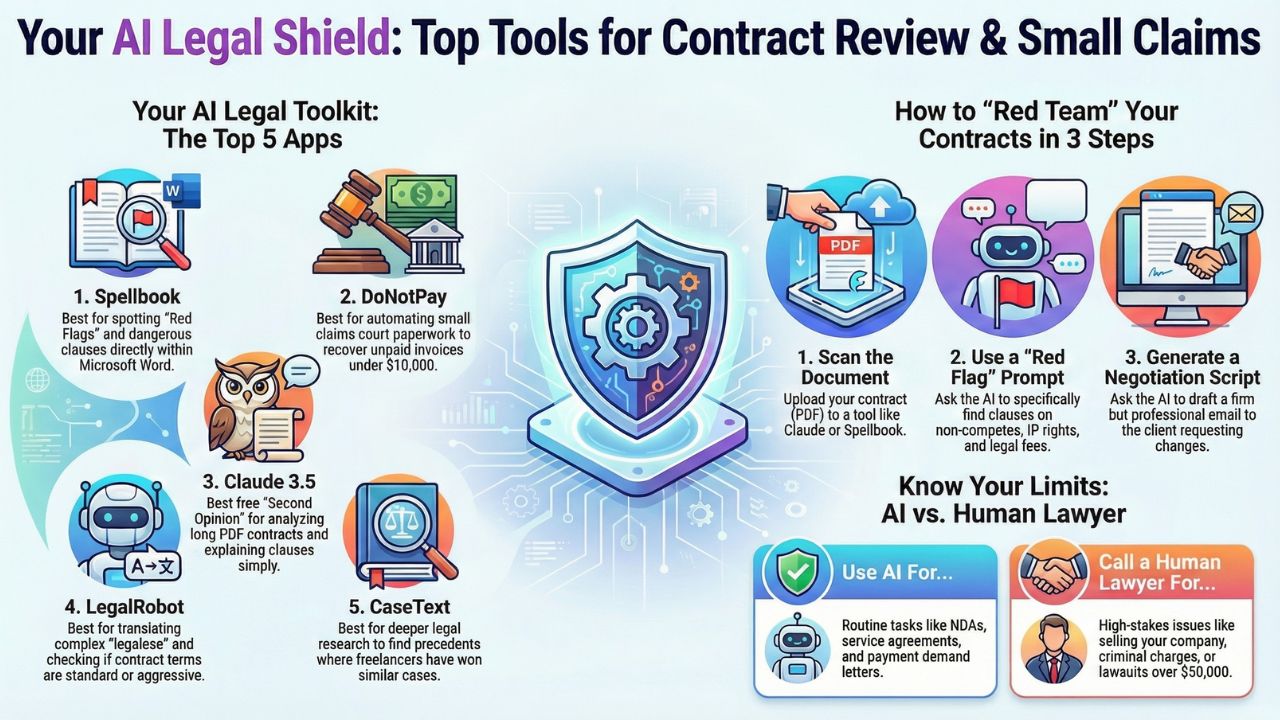
1. Spellbook (Best for Contract "Red Flags")Spellbook operates directly inside Microsoft Word. It uses GPT-4 to read your contract and suggest changes instantly.
- The "Killer" Feature: The "Red Flag" scan. You can ask it, "Find any clause that hurts my rights as a freelancer," and it will highlight trap-door clauses like "Work for Hire" or "Indefinite Non-Compete."
- Cost: Free trial available; paid plans start at ~$15/mo.
- Best For: Freelancers signing client agreements.
Known as "The World's First Robot Lawyer," DoNotPay is essential for small claims court automation.
- How it Works: If a client owes you money, the bot asks you a few questions and automatically generates the court filing paperwork.
- The Bonus: It even gives you a script to read in front of the judge.
- Best For: Recovering unpaid invoices under $10,000.
You don't always need a specialized app. Claude 3.5 (by Anthropic) has a massive context window, meaning you can upload an entire 50-page PDF and ask questions.
- Prompt to Use: "Act as a strict contract lawyer. Review this attached PDF and list the 3 most dangerous clauses for me as the service provider. Explain them in simple English."
- Cost: Free.
LegalRobot uses AI to compare your contract against industry standards. It tells you if a clause is "standard" or "unusually aggressive."
- The Benefit: It translates complex legal jargon into plain English so you actually understand what you are signing.
If you are in a deeper dispute, CaseText (powered by CoCounsel) helps you find legal precedents.
- Why use it: If a client threatens to sue you, you can use this to find similar cases where the freelancer won. It empowers you to reply with confidence.
Tutorial: How to "Red Team" Your Contracts with AI
Don't just sign. Use this workflow to protect yourself.
Step 1: The UploadTake your PDF contract and upload it to Claude or Spellbook.
Step 2: The "Red Flag" PromptDon't just ask "Is this good?" Be specific. Use this prompt:
"Analyze this contract for a freelance web designer. Flag any clauses that: 1) Prevent me from working with other clients (Non-Compete), 2) Assign my IP before payment is made, or 3) Force me to pay the client's legal fees (Indemnification)."Step 3: The "Negotiation" Script
Once the AI finds a bad clause, ask it to write a polite email for you:
"Write an email to my client asking to remove the Non-Compete clause. Keep the tone professional but firm, explaining that as a specialist, I cannot limit my ability to earn a living."
The Risk: When to Call a Human
AI is a tool, not a judge. Use AI for routine NDAs, Service Agreements, and letters demanding payment.
Call a Human for: Selling your company, criminal charges, or lawsuits over $50,000.
Conclusion: Your Digital Legal Shield
The AI Fortress isn't just about making money; it's about keeping it. By using free AI legal advice tools, you stop being a "little guy" and start operating with the legal coverage of a corporation.
Now that your money is growing (Trading Bots) and protected (Legal AI), let's look at the biggest threat to your reputation: Deepfakes.
Frequently Asked Questions (FAQ)
You can use ChatGPT for legal contracts review, but never for final legal advice. It is great for summarizing and finding typos, but it can "hallucinate" (invent) laws. Always verify with a specialized tool or human.
Yes. DoNotPay helps you generate the paperwork (which is the hard part). You still have to file it and represent yourself, but the AI does 90% of the prep work.
Spellbook or LegalRobot are best for NDAs because they are trained specifically on contract language and can instantly spot non-standard terms.
Sources and References
- Deepfake Defense in Banking
- How to Use Claude for Legal Analysis
- Top five AI legal assistants to optimise your firms in 2024
- Small Claims Automation Data
- Best Legal AI Software Review (CaseText)
Disclaimer: This content is for informational purposes only and does not constitute legal advice. Always consult a qualified lawyer for serious legal matters.