Building a "Marketing Agent Swarm": Replace Your Ad Agency with CrewAI
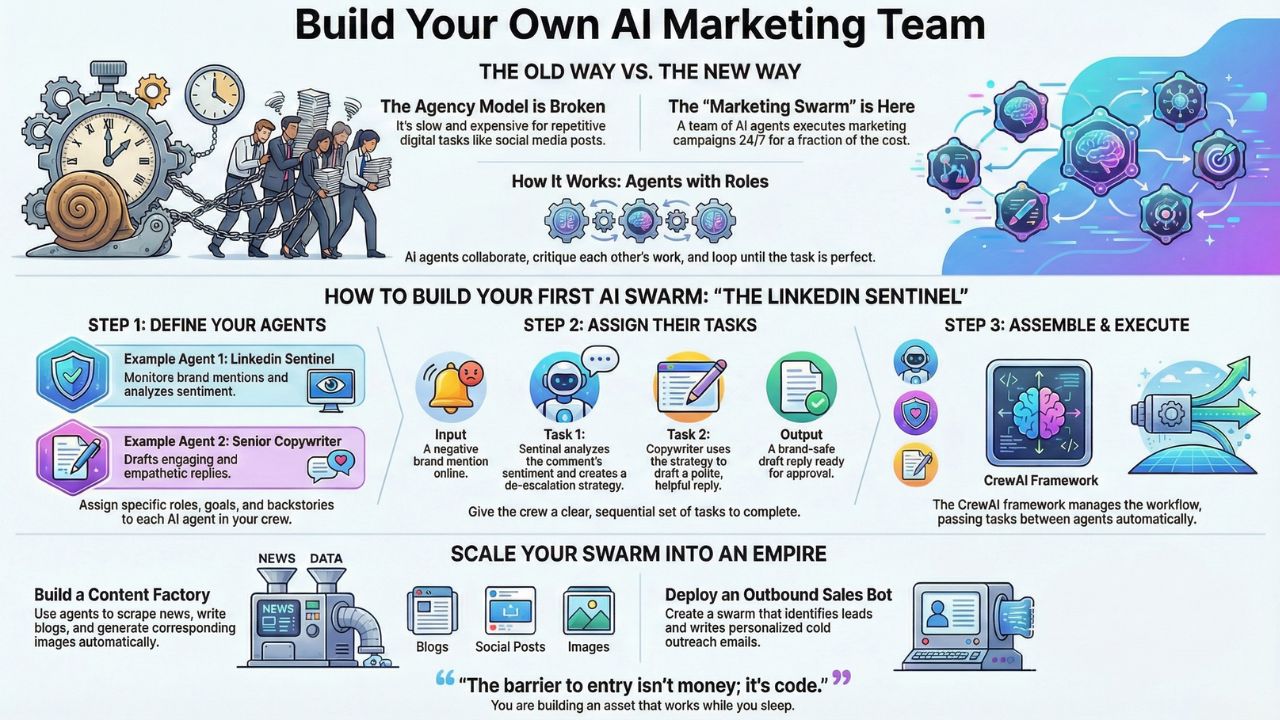
The Agency Model is Broken
You are paying a retainer of $5,000/month for a junior copywriter to tweet three times a week. It’s slow, it’s expensive, and frankly, it’s obsolete.
Welcome to the era of autonomous marketing agents. In 2026, we don't hire staff for repetitive digital tasks; we spawn them.
By using AI agent workflow automation, you can build a "Marketing Swarm", a team of AI bots that talk to each other, critique each other's work, and execute campaigns 24/7.
This isn't a future prediction. It is a CrewAI marketing tutorial you can build today. Below, we will replace a 5-person agency team with a single Python script.
Explore Generative Engine Optimization (GEO) 2026 Hub
- Generative Engine Optimization (GEO) 2026: The Ultimate Guide to Ranking in AI Search
- Audit Your Brand on AI: How to Control What ChatGPT Says About You
- Video SEO 2026: Ranking in Sora, Veo, and YouTube AI
- Zero-Click Content Strategy: How to Monetize Without Traffic
- Best AI Marketing Tools 2026: The Agentic Stack (Review)
- GEO in India: Optimizing for 'Hinglish' and Voice Search
Why "Agentic" Marketing?
Most people use ChatGPT like a chatbot: one prompt, one answer. That is not how you scale. To replace marketing agency with AI, you need agents that have roles and goals.
- Agent A (The Researcher): Scours the web for trends.
- Agent B (The Copywriter): Writes a post based on Agent A's research.
- Agent C (The Manager): Reviews the copy and rejects it if it's too salesy.
This is a Python marketing bot ecosystem. The agents loop until the work is perfect.
The Tutorial: Building the "LinkedIn Sentinel"
We are going to build a specific swarm called the "LinkedIn Sentinel." Its job is to monitor brand mentions and draft replies for you to approve.
Prerequisites:
- Python installed
- OpenAI API Key
pip install crewai
Step 1: Import Your Tools
First, we set up the environment. While we are using CrewAI for the orchestration, advanced users can integrate LangChain for marketers to add custom tools (like scraping specific URLs).
Step 2: The Code (Copy-Paste This)
Here is the actual Python code to spin up your swarm.
import os
from crewai import Agent, Task, Crew, Process

# 1. Setup your 'Brain'
os.environ["OPENAI_API_KEY"] = "YOUR_API_KEY"

# 2. Define Your Agents
# The 'Sentinel' watches for mentions (simulated here for the tutorial)
sentinel_agent = Agent(
    role='LinkedIn Sentinel',
    goal='Monitor brand mentions and protect reputation',
    backstory="""You are a senior PR crisis manager. You never sleep.
    You monitor all mentions of the brand 'TechCorp'.""",
    verbose=True,
    allow_delegation=False,
    # Tools would be added here (e.g., LinkedIn Scraper)
)

# The 'Copy Chief' drafts the reply
responder_agent = Agent(
    role='Senior Copywriter',
    goal='Draft engaging, empathetic replies to LinkedIn comments',
    backstory="""You are a witty, professional social media manager.
    You turn negative comments into brand wins.""",
    verbose=True,
    allow_delegation=False
)

# 3. Define the Task
# In a live production env, this input comes from a webhook
incoming_mention = "TechCorp's new update completely broke my workflow. I'm cancelling!"

analysis_task = Task(
    description=f"""Analyze the sentiment of this comment: '{incoming_mention}'.
    If negative, outline a de-escalation strategy.""",
    agent=sentinel_agent
)

drafting_task = Task(
    description=f"""Using the strategy from the Sentinel, draft a polite
    and helpful LinkedIn reply to the user. Keep it under 50 words.""",
    agent=responder_agent
)

# 4. Assemble the Crew
marketing_swarm = Crew(
    agents=[sentinel_agent, responder_agent],
    tasks=[analysis_task, drafting_task],
    verbose=2,
    process=Process.sequential
)

# 5. Execute
result = marketing_swarm.kickoff()

print("######################")
print("## FINAL DRAFT REPLY ##")
print("######################")
print(result)
Step 3: Deployment
When you run this script, you will see the agents "talking" in your terminal. The Sentinel will analyze the anger in the comment, pass a strategy to the Copywriter, and the Copywriter will generate the final text.
This is basic auto-posting AI agents logic. To make it fully autonomous, you would connect the output to the LinkedIn API to post automatically (though we recommend a "Human-in-the-Loop" approval step for safety).
Scaling Up: From Sentinel to Empire
Once you have mastered the Sentinel, you can expand your swarm.
- The Content Factory: One agent scrapes news, another writes blogs, a third generates images.
- The Outbound Sales Bot: Identifies leads and writes personalized cold emails.
The barrier to entry isn't money; it's code. By building these autonomous marketing agents, you aren't just saving fees; you are building an asset that works while you sleep.
Frequently Asked Questions (FAQ)
Yes, basic Python knowledge is helpful for this CrewAI marketing tutorial. However, low-code versions are emerging. The code provided above is a template you can modify with minimal experience.
Yes. You can build auto-posting AI agents by connecting them to APIs (like the LinkedIn or X API). However, for brand safety, most companies keep a human in the loop to approve the final draft before it goes live.
An agency charges for hours. A Python marketing bot runs for pennies in electricity and API credits. For tasks like "monitoring mentions" or "reformatting blog posts," AI is faster, cheaper, and more consistent than a human junior executive.
LangChain for marketers is the toolkit that connects your agents to the real world. It allows your agents to "Google" things, read PDFs, or access your CRM. CrewAI handles the team management, while LangChain handles the tools.
Sources and References
- CrewAI Official Documentation
- LangChain: The library for connecting AI agents to external data and APIs.
- OpenAI API: The "brain" powering the agents in the code block.
- Midjourney: Mentioned as the tool for the "Designer Agent" in the swarm.
- Python.org: The programming language required to run these agents.