5 AI-Coding Assistants Better Than Copilot for 2026
Let’s be honest: GitHub Copilot is great, but in 2026, it is starting to feel like just a fancy autocomplete. We have moved past the era of "predicting the next word."
We are now entering the era of The Autonomous Development Environment. These aren't just plugins that sit in VS Code waiting for you to type; they are intelligent "Junior Developers" that can refactor entire folders, fix bugs while you sleep, and understand your entire codebase instantly.
If you are looking for the best AI coding assistant 2026 has to offer, sticking with the basics will slow you down. Here are the top 5 tools that are leaving Copilot in the dust.
Explore the Global AI Engineering Handbook
- Global AI Engineering Handbook 2026: Agentic Swarms & Sovereign AI
- 7 AI Agents You Can Build This Weekend
- Top 10 Open Source LLMs for 2026
- 8 Deep-Tech AI Startups Defining 2026 | Global vs Sovereign
- 12 AI Skills to Master in 2026: Systems Architect Roadmap
- 8 Indian AI Startups Hiring Aggressively in 2026
1. Cursor (The Editor, Not Just a Plugin)
The "Junior Developer" You Can Hire for Free
Cursor isn't just an extension you install; it is a fork of VS Code itself. Because it is the editor, it has superpowers that standard plugins simply don't have. It understands your file tree, your terminal, and your diffs in a way an external tool never could.
The Killer Feature: "Composer" (Ctrl+I)
- Most AI tools suggest one line at a time. Cursor’s Composer feature can refactor entire multi-file directories at once.
- You can highlight a folder and type, "Update the API response format across all these 5 files and fix the broken tests," and it will execute the plan across the board.
Why it wins: It doesn't just write code; it architects it. It moves you from "typing" to "directing."
Learn More: Search for a cursor composer feature tutorial to see how it can refactor an entire folder in seconds.
2. Windsurf (by Codeium)
The "Mind Reader" that Keeps You in the Flow
If Cursor is the architect, Windsurf is the mind-reader. Built by the team at Codeium, Windsurf focuses entirely on maintaining your "Flow" state. It is designed to feel invisible.
The Killer Feature: Deep Context Awareness
- Windsurf doesn't just look at the file you are open to; it predicts your next 5 minutes of work.
- It anticipates where you are going next. If you are writing a function that uses a database model defined in a different folder, Windsurf knows that context immediately without you needing to open that file manually.
The Big Debate: In the battle of Cursor vs Windsurf codeium, Windsurf wins on fluidity. It feels less like commanding a robot and more like coding with a telepathic partner.
3. Supermaven
The "Legacy Code" Archaeologist
Do you work on a massive, messy codebase that is 10 years old? This is where standard AI tools fail, they run out of memory. Meet Supermaven.
The Killer Feature: 1 Million Token Context Window
- Supermaven has the fastest and largest context window on the market, 1 million tokens.
- In simple terms, this means it can "read" your entire repository, every single file, no matter how huge, instantly.
- It remembers code you wrote six months ago at the very bottom of a forgotten utility file.
Review Verdict: In our Supermaven context window review, it proved to be the only tool capable of understanding spaghetti code without hallucinating. It is great for legacy codebases where you need to know everything before you change anything.
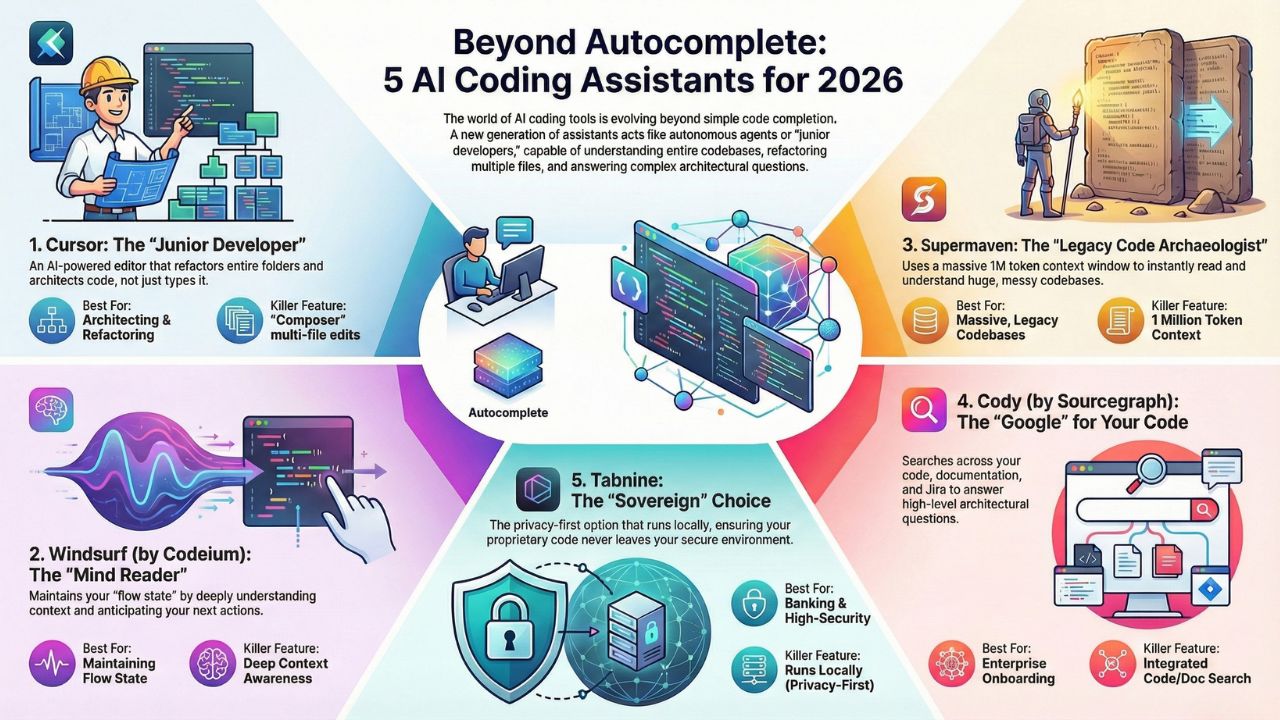
4. Cody (by Sourcegraph)
The "Google" for Your Enterprise Code
Cody is built for the enterprise. It doesn't just look at your code; it connects to your documentation, your Jira tickets, and your Confluence pages.
The Killer Feature: Enterprise Search
- Instead of just writing loops and functions, you can ask Cody high-level architectural questions like: "Where is the auth logic defined?" or "How do we handle API rate limiting in this repo?".
- It searches through millions of lines of code and docs to find the exact answer.
Why Enterprise Loves It: It saves hours of digging through wiki pages. It is the best tool for onboarding new developers who don't know the system yet.
5. Tabnine (Privacy-First)
The "Sovereign" Choice for Banking & Security
For developers in banking, fintech, or healthcare, especially in regions like India or the EU, sending code to the cloud is a huge "No." You cannot risk proprietary algorithms leaking.
The Killer Feature: Local Execution
- Tabnine is the leader in privacy-first AI coding tools. It can run entirely locally on your machine or on a private server (VPC).
- Your code never leaves your secure environment. It is the essential choice for banking devs who cannot send code to the cloud.
Security Check: When evaluating tabnine for enterprise security, it stands alone as the safe choice for compliant industries.
Frequently Asked Questions (FAQs)
Not yet, but it is falling behind. Copilot is excellent for "completion" (finishing your sentence), but tools like Cursor and Windsurf are better at "generation" (writing the whole paragraph or file). Copilot is just autocomplete; these new tools are Autonomous Agents.
Cursor is fantastic for beginners because you can use the "Composer" feature to write code using plain English instructions. You can describe what you want, and Cursor figures out how to write the syntax.
Tabnine. It is the industry standard for privacy. It ensures no sensitive banking data or proprietary algorithms are ever sent to a public AI model.