AI Bookkeeping: How to Automate Your Business Taxes
Does the thought of tax season make you panic?
For most solopreneurs, April is the most stressful month of the year. You stop working on your business to dig through shoeboxes of receipts and months of unorganized bank statements. Tax season shouldn't paralyze your business.
In 2026, you don't need to be an accountant to have perfect books. You just need the right automated bookkeeping software for small business. This guide explores how to use AI to categorize expenses in real-time and ensure you never miss a deduction again.
Explore the AI Solopreneur Hub
- The AI Solopreneur: Guide to One-Person Enterprise
- Top 10 AI Agents That Replace Marketing Agencies in 2026
- Best AI CRM Tools for Solopreneurs: Salesforce vs. HubSpot AI
- AI Chatbots vs. Virtual Assistants: The Support Battle
- Best Business Credit Cards for AI Startups
- Using Predictive AI for Stock Market Analysis
- Cybersecurity for Solopreneurs: Protecting Data from Deepfakes
- Cloud Hosting for AI: GPU vs. CPU Servers
- Do You Need Business Insurance for an AI Agency?
- How to Build a $10k/Month Business with $0 Upfront Cost
- Case Study: I Let AI Run My Dropshipping Store for 30 Days
- The Death of 9-5: Agentic AI & The Solopreneur Boom
The Old Way vs. The AI Way
The Old Way (Manual)
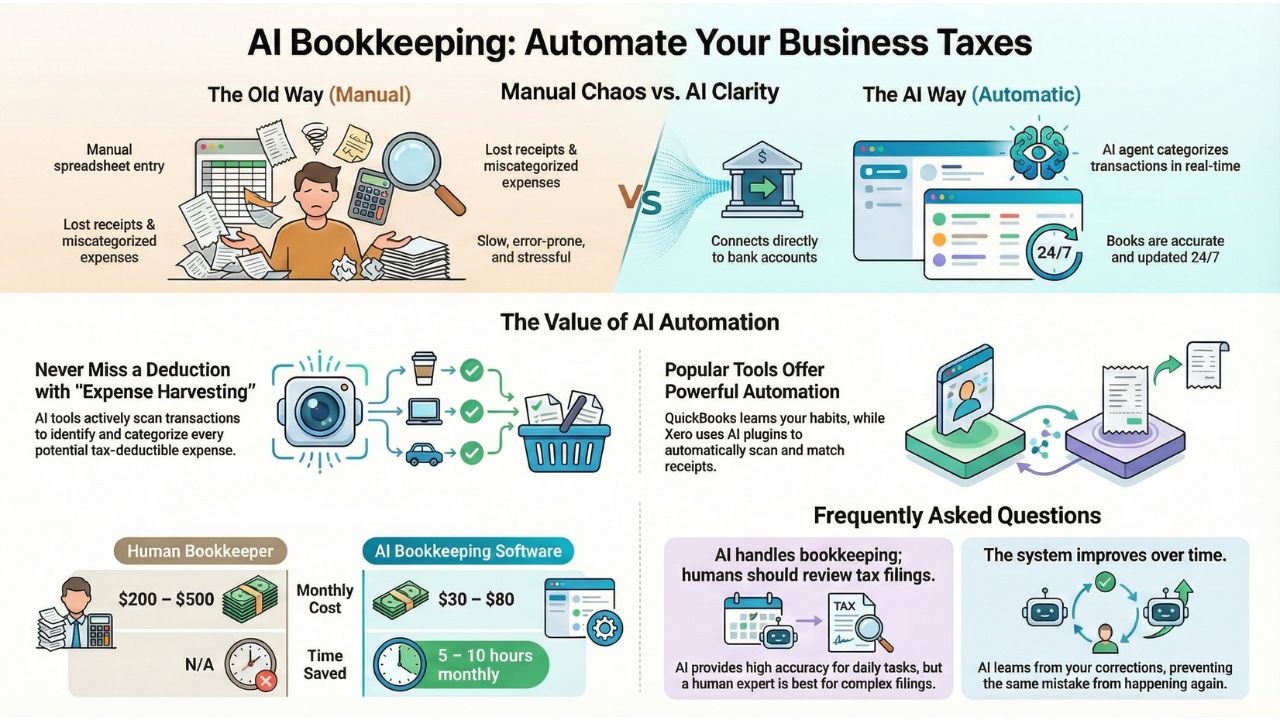
You manually enter data into a spreadsheet at the end of the month. You lose receipts. You guess which category a dinner expense belongs to. It’s slow, boring, and prone to mistakes.
The AI Way (Automatic)
You connect your bank account to cloud accounting solutions for solopreneurs. An AI agent watches every transaction. You buy a coffee? It tags it as "Meals & Entertainment." You pay for software? It tags it as "Office Expenses." Result: Your books are done instantly, 24/7.
Top Tools: QuickBooks vs. Xero AI
The two giants of the industry have evolved. When looking at quickbooks vs xero automation features, both now offer powerful AI integrations that do the heavy lifting for you.
1. QuickBooks Online (The Heavyweight)
QuickBooks has aggressive AI that learns your habits. If you classify a vendor as "Advertising" once, the AI will remember it forever. It is often rated as the best tax preparation software for freelancers 2026 because it connects directly to TurboTax for seamless filing.
2. Xero + AI Plugins (The Flexible Choice)
Xero shines when you add plugins. By integrating tools like Dext or Hubdoc, you can snap a photo of a receipt, and the AI extracts the data and matches it to the bank transaction automatically. This is the gold standard for how to automate business expense tracking.
Real-Time "Expense Harvesting"
The biggest benefit of AI powered accounting tools reviews is "Expense Harvesting." AI tools don't just record what you spend; they look for what you should claim. They scan your transactions to ensure you never miss a deduction.
- Real-Time Categorization: The software categorizes expenses in real-time, meaning your Profit & Loss statement is always up to date.
- Receipt Matching: No more hoarding paper. The AI matches digital receipts to bank lines automatically.
The Cost: Is It Worth It?
Many founders worry about the corporate tax filing software cost. However, consider the alternative. A human bookkeeper charges $200-$500/month.
| Accounting Solution | Estimated Cost | Estimated Time Saved |
|---|---|---|
| Human Bookkeeper | $200–$500/month | Variable |
| AI Software Cost | $30–$80/month | 5–10 hours per month |
For a "Zero-Employee Enterprise," this efficiency is non-negotiable.

Frequently Asked Questions (FAQs)
Yes, but with a caveat. AI tools can automate the categorization and reconciliation of transactions with high accuracy. However, a final review by a human CPA is still recommended for complex tax filings to ensure total compliance.
AI learns from corrections. If it categorizes something wrong and you fix it, it won't make that mistake again. This is why cloud accounting solutions for solopreneurs are safer than spreadsheets, they get smarter over time.
Absolutely. There are specific best tax preparation software for freelancers that cater to Schedule C filers, ensuring personal and business expenses are kept separate.
Sources and References
Compliance Standards:
Market Data & Trends: