Cloud Hosting for AI Applications: GPU vs. CPU Servers
If you are building AI applications, your hosting choice is not just a technical detail, it dictates your profit margins. Building a standard WordPress blog is easy; you just need a simple, cheap server.
But building an "AI Solopreneur" business is a different beast.
You are likely running heavy code that "thinks," generates images, or analyzes massive datasets. If you pick the wrong server infrastructure, two things will happen: either your app will be painfully slow, driving users away, or your monthly cloud bill will destroy your profits.
This guide breaks down the technical differences between GPU and CPU servers and helps you find the best GPU server hosting for AI models without breaking the bank.
Explore the AI Solopreneur Hub
- The AI Solopreneur: Guide to One-Person Enterprise
- Top 10 AI Agents That Replace Marketing Agencies in 2026
- Best AI CRM Tools for Solopreneurs: Salesforce vs. HubSpot AI
- AI Chatbots vs. Virtual Assistants: The Support Battle
- Best Business Credit Cards for AI Startups
- AI Bookkeeping: Automate Your Business Taxes
- Using Predictive AI for Stock Market Analysis
- Cybersecurity for Solopreneurs: Protecting Data from Deepfakes
- Do You Need Business Insurance for an AI Agency?
- How to Build a $10k/Month Business with $0 Upfront Cost
- Case Study: I Let AI Run My Dropshipping Store for 30 Days
- The Death of 9-5: Agentic AI & The Solopreneur Boom
The Basics: GPU vs. CPU (And Why It Matters)
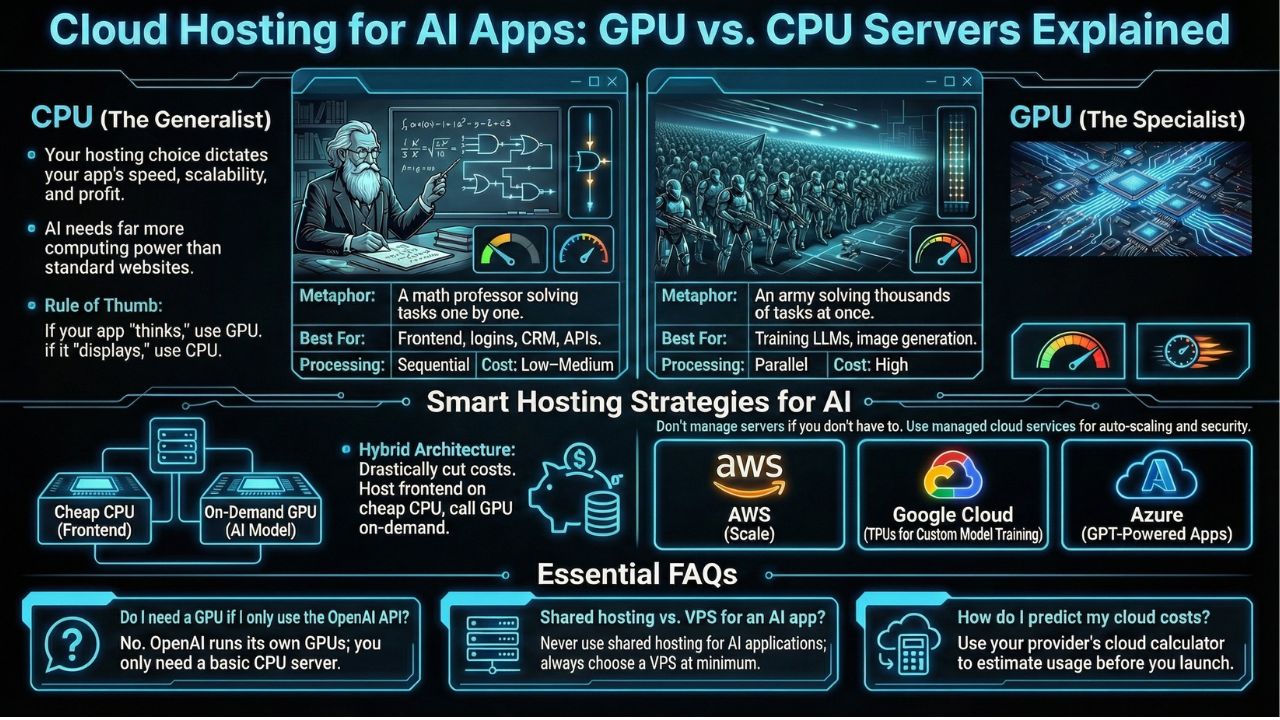
Before you swipe your credit card, you need to understand the hardware. The difference between a CPU and a GPU is the difference between a mathematician and an army.
1. CPU (The Generalist)
Think of a CPU (Central Processing Unit) like a brilliant math professor. It is incredible at handling complex logic, running databases, and serving web pages one by one. It focuses on sequential processing.
- Best for: Hosting your website's frontend, running your CRM, handling user logins, and standard API requests.
- Cost: Low to Medium.
2. GPU (The Specialist)
Think of a GPU (Graphics Processing Unit) like an army of thousands of students working on simple math problems at the exact same time. AI models, specifically deep learning, require millions of tiny calculations to happen simultaneously. A CPU chokes on this; a GPU thrives on it.
- Best for: Training AI models, fine-tuning open-source LLMs (like Llama 3), and generating images (like Stable Diffusion).
- Cost: High.
The Rule of Thumb: If your app "thinks" (calculates vectors, renders images), you need a GPU. If it just "displays" (shows text, buttons, forms), you need a CPU.
The Big Players: AWS vs. Google Cloud vs. Azure
When looking at AWS vs Google Cloud vs Azure for startups, the choice can be overwhelming. Each has distinct advantages for the AI solopreneur.
AWS (Amazon Web Services)
The market leader for a reason. AWS offers the broadest range of tools.
- Pros: Massive ecosystem. If you need a specific tool, AWS has it.
- Cons: Complexity. The dashboard can feel like the cockpit of a spaceship.
- Verdict: Best if you plan to scale rapidly and need enterprise-grade reliability.
Google Cloud Platform (GCP)
Google is an AI-first company. They invented the "Transformer" architecture that powers modern AI.
- Pros: Access to TPUs (Tensor Processing Units), which are specialized chips often faster and cheaper than standard GPUs for specific tasks. Their cloud computing costs for machine learning calculators are also very transparent.
- Verdict: Excellent for developers who are building their own models from scratch.
Microsoft Azure
Azure is the backbone of OpenAI.
- Pros: If you are building apps that rely heavily on GPT-4 or OpenAI's API, Azure offers the tightest integration and security.
- Verdict: Best for solopreneurs building "wrapper" apps around OpenAI's technology.
The Budget-Friendly Option: VPS and Dedicated Servers
You don't always need a trillion-dollar tech giant to host your app. In fact, for a bootstrapped solopreneur, "The Big Three" might be overkill.
1. Cheapest VPS Hosting for Developers
A Virtual Private Server (VPS) is a "slice" of a physical server. It mimics a dedicated server but is shared on hardware level.
- Why choose it: For testing your AI agents or hosting the web interface of your app, looking for the cheapest VPS hosting for developers (like DigitalOcean, Linode, or Vultr) is the smartest move.
- Cost: You can get full control for as little as $5–$20 a month.
2. Dedicated Server Hosting for High Traffic Websites
As your "Zero-Employee Enterprise" grows, sharing resources becomes a risk. If a "neighbour" on your server gets a traffic spike, your site might slow down.
- Why choose it: Dedicated server hosting for high traffic websites gives you an entire physical machine. No sharing. This provides the consistent performance needed for scaling a serious SaaS business.
- Cost: Starts at $100+ per month, but you get raw power.
Scalability: Growing Without Crashing
The ultimate goal is to build a scalable server infrastructure for SaaS. Imagine your AI tool goes viral on Twitter. Suddenly, 5,000 users try to generate images at once.
- If you aren't scalable: Your server crashes. You lose revenue.
- If you ARE scalable: Your infrastructure "auto-scales." It automatically spins up new servers to handle the load and shuts them down when traffic drops.
If you don't want to manage this complexity yourself (which requires deep technical skills), you should look for managed cloud hosting services reviews. Managed hosts (like Cloudways, Heroku, or Render) handle the security, updates, and auto-scaling for you. You pay a slight premium, but you buy back your time to focus on coding and marketing.
The Hybrid Approach: Saving Money
Here is a pro-tip for the AI Solopreneur: You don't need a GPU for everything. Most successful AI apps use a Hybrid Architecture:
- Frontend (CPU): Host your website and user database on a cheap CPU VPS.
- AI Engine (GPU): Rent a GPU server by the second (using services like Modal or Replicate) only when a user actually asks a question.
This way, you aren't paying $500/month for an idle GPU server that no one is using at 3 AM. You only pay for the compute you actually use.
Frequently Asked Questions (FAQs)
No. If you are just calling an API (like GPT-4), OpenAI handles the heavy lifting on their GPUs. You only need a standard CPU server to send the request and display the answer to your user. You only need your own GPU hosting if you are running your own open-source models (like Llama 3, Mistral, or Stable Diffusion) directly.
Shared hosting is like living in a college dorm; you share the bathroom and kitchen (resources) with messy roommates. If they are loud, you suffer. VPS is like having your own apartment; you have your own dedicated space and resources. For AI apps, never use shared hosting, it is too weak.
Cloud bills are notorious for being confusing. Most providers offer a "Calculator" tool. Always map out your usage before launching. For example, estimate how many AI generations you expect per user per day. Without this, you might wake up to a surprise $5,000 bill.
Yes! Serverless (like AWS Lambda or Vercel) is great for the "glue" code that connects your user to the AI. It scales to zero, meaning you pay nothing when no one is using your app.
Sources and References
Compliance Standards:
Market Data & Trends: